PawsPet

PawsPet for pet owners

Tortoise care app: certificates, weight and hibernation notes

Whether you keep a tortoise or an aquatic turtle, PawsPet gives it a profile with the «Turtle» species, a photo and its details. There you store certificates with number, issuer and expiry date, log weight in the measurements tab and note the start and end of hibernation as activities. There is no dedicated hibernation tracker: you enter the data, the app keeps it in order and alerts you on the dates you set.

Continue in PawsPet
Activities and reminders — PawsPet

PawsPet

Why it helps

Certificates with number, issuer and expiry under control

Pick the type (Certificate, Microchip registration, Other), enter title, number and issuer, then attach scans as PDF or photos, across several pages if needed. Once you set an expiry date, add one or more reminders a chosen number of days before it.

Weight before and after hibernation, in grams when small

In the «Measurements» tab you log weight in kilograms with decimals; below 1 kg it shows grams. Each reading shows the change from the previous one and, with two or more readings, a chart. Weigh your tortoise before hibernation and on waking, then compare.

Hibernation start and end as activities with notes

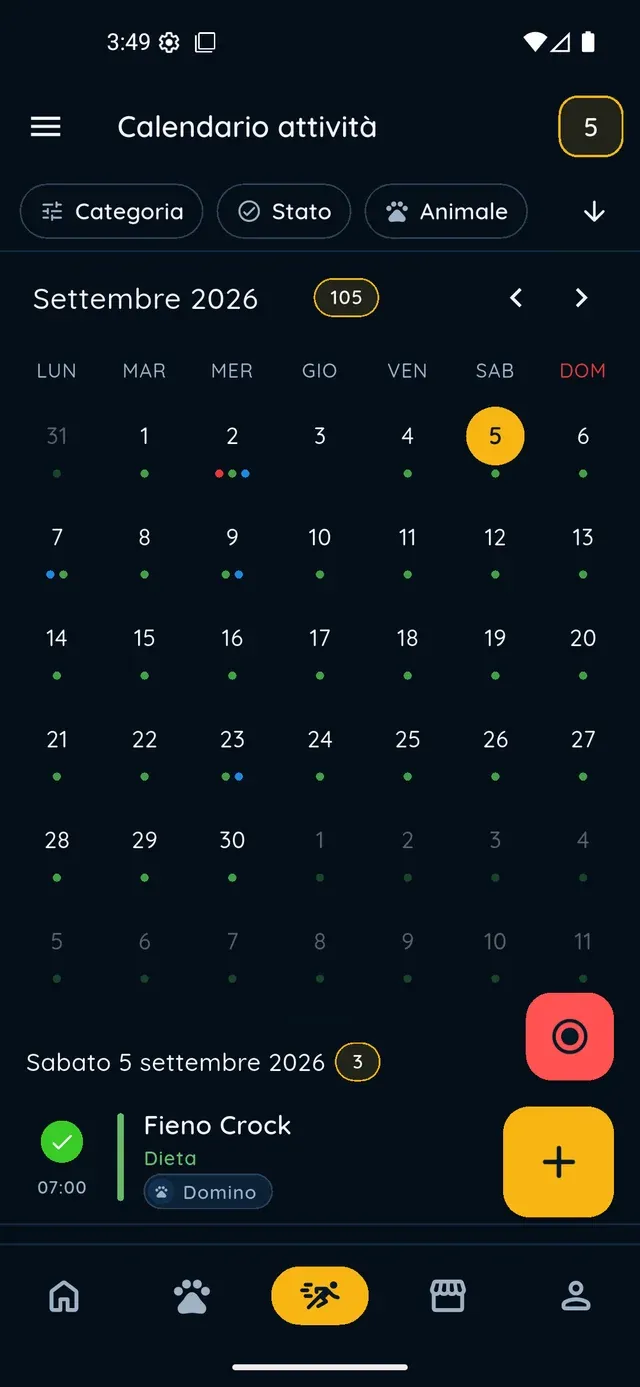
No hibernation tracker: you use activities. Create an all-day «Hibernation start» activity, select the tortoise and note temperature, location and weight. For waking, create «Hibernation end» on the planned date with a reminder; for check-ups use «Repeat».

Several animals, one profile each

Each tortoise has its own profile with photo, name, date of birth, sex, colour, marks and location (enclosure or tank). The «Pets» list is searchable by name, species, breed, colour or location and switches to a photo grid, handy when animals look alike.

Tortoises and turtles

What it means for your day.

  1. Create the tortoise's profile

    «Pets» tab » «+». Photo (optional), name and date of birth; then the «Turtle» species from the grid and, if you like, a breed from the suggestions (Hermann's, Greek, red-eared slider...); sex, colour and marks; location and microchip. At the last step, upload a document right away or tap «Not now».

  2. Upload certificates and set reminders

    Open the tortoise » «Anagraphic» tab » «Documents» strip » «See all» » «+». Pick the type, fill in the title, number and «Issued by», add the dates and attachments. Once an expiry date is set, reminder options appear: choose how many days before you want the alert and tap «Save».

  3. Log weight and note hibernation

    «Measurements» tab » «+» » date, weight in kg, optional note » «Save» (one per day). For hibernation: «Activities» tab » «+» » name «Hibernation start», «All day» on, a type (e.g. «General» » «Rest»), the tortoise under «Pets», notes » «Save». On the planned wake-up date, create «Hibernation end».

Tortoises and turtles

Frequently asked questions

Is PawsPet a tortoise care app or only for dogs and cats?

It is for every animal: the species grid includes «Turtle», with suggested breeds for both land tortoises (Hermann's, Greek, marginated, Russian) and aquatic turtles (red-eared slider, Pelomedusa). The features are the same as for any profile: details, documents, measurements and activities. Beyond that, there are no screens built specifically for tortoises.

How do I store my tortoise's CITES certificate or registration papers?

Open the tortoise » «Anagraphic» » «Documents» strip » «See all» » «+». Choose the type (for example «Certificate» or «Other»), enter the title, number and «Issued by», set the dates and attach scans as PDF or photos. If the document has an expiry date, you can switch on one or more reminders a set number of days before it.

Is there a hibernation tracker?

No, there is no dedicated feature. The practical way is to create two activities, «Hibernation start» and «Hibernation end», with the tortoise selected and notes (temperature, location, weight); for periodic checks, add an activity with «Repeat» and a reminder. You log the weight itself in «Measurements», so you see the change between the two dates.

My turtle weighs less than 1 kg: how do I enter its weight?

In the «Measurements» tab you enter weight in kilograms with decimals (for example 0.85); below 1 kg the app shows it in grams. There is one measurement per day: reopening the same day updates the existing one. Measurements cannot be deleted from this screen: you can correct them, or ask the Copilot assistant to delete one (it asks you to confirm first).

Can I keep several tortoises in the same account?

Yes: each animal has its own profile. In the «Pets» list you search by name, species, breed, colour or location, switch to the photo grid and, when the list is long, use the alphabetical index on the right edge. Profiles can be created offline too: the data is sent as soon as you are back online.

PawsPet

Create your tortoise's profile

Download PawsPet, add your tortoise in five steps and upload the first certificate. No subscription: the app for pet owners is free.

Download PawsPet

App screenshots with demonstration or test data.