PawsPet

PawsPet for pet owners

Hamster and small pet care app: weight and routines in order

Hamsters, pet rats, guinea pigs and gerbils weigh very little and change fast. PawsPet is a hamster and small pet care app: one profile per animal, weight in grams with a chart, cage cleaning as a repeating activity with an alert, and a record you share with the people at home. It does not diagnose and does not replace your vet: it keeps what you record in order.

Continue in PawsPet
Activities and reminders — PawsPet

PawsPet

Why it helps

A profile for every small housemate

Pick «Rodent» as the species, or «Hamster» and «Rat» from «Show all species»; for a guinea pig, gerbil or chinchilla you can choose «Other» and type the name yourself. Each animal has a photo, date of birth, sex and breed, plus its own health record.

Weight in grams, with the change at a glance

In «Measurements» you enter the weight in kg with decimals: below 1 kg the app shows it in grams. Each row of the history shows the change from the previous reading, and the chart shows the trend. One measurement per day, with a photo and notes if you want.

Cage cleaning and routines that come back on their own

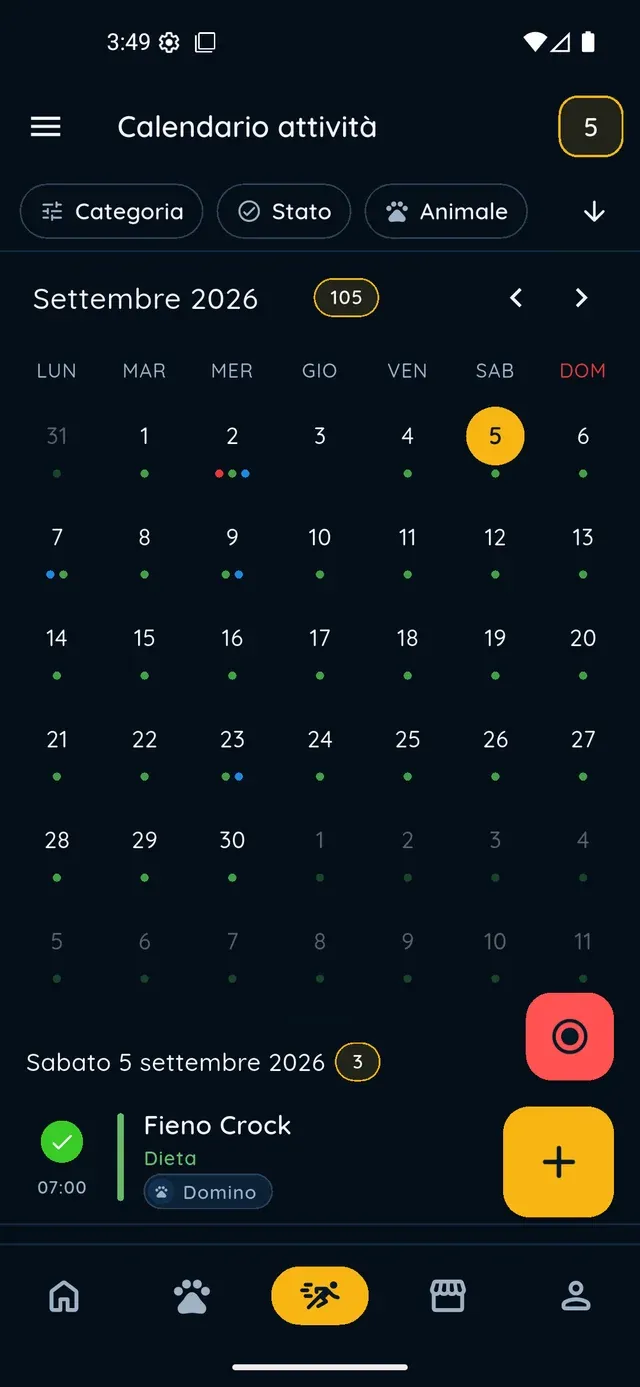
Create a «Cage cleaning» activity (or bedding change), set «Repeat» to every week or every N days and add an alert before the time. The app generates the future occurrences in the calendar: tick them off when done, or skip one and leave the rest alone.

A record shared with the people at home

Invite a family member as a collaborator and decide what they can view and what they can edit: health and measurements, activities, basic details. Access stays until you remove it. Whoever looks after your pet while you are away sees it under «Shared with me».

Hamsters and rodents

What it means for your day.

  1. Create your hamster’s or rodent’s profile

    In the «Pets» tab tap + and follow the five steps: a photo (or «Skip the photo»), the name and the date of birth. Choose the species: «Rodent» from the grid, or «Hamster» or «Rat» after «Show all species». Set sex and neutering; microchip and booklet number are optional. It works offline too.

  2. Log the weight every time you weigh them

    Open the animal, go to the «Measurements» tab and tap +. Keep today’s date (or pick a past day), type the weight in kg with decimals, for example 0.095, add a photo or a note if you want and tap «Save». The value shows up right away in the summary, the history and the chart.

  3. Put cage cleaning on the calendar

    In the «Activities» tab tap +. Type «Cage cleaning» in the «Name» field, choose the type (for example «Hygiene») and select the animal. Tap «Repeat» and choose «Every N weeks» with the day; then the bell, «Set» and an alert such as «1 day before». Tap «Save»: the next cleanings appear on their own.

Hamsters and rodents

Frequently asked questions

Is PawsPet a good hamster and small pet care app, or is it only meant for dogs and cats?

It works for small rodents too. «Hamster» and «Rat» are species in the app (find them under «Show all species»), while «Rodent» covers guinea pigs, gerbils, chinchillas and degus; with «Other» you type the name yourself. Profile, measurements, activities and collaborators work the same way for every species.

Where do I record my hamster’s weight, and why is it shown in grams?

Open the animal from the «Pets» tab, go to «Measurements» and tap +, then enter the weight and save. The field is in kg and accepts decimals; when the value is below 1 kg the app shows it in grams, so 0.085 becomes 85 g. The app keeps one measurement per day: if you reopen the same day, you are updating the one already recorded.

How do I set a reminder for cage cleaning?

Create an activity from the «Activities» tab with the + button, name it «Cage cleaning», tap «Repeat» and choose «Every N weeks» with the days you want (or «Every N days»). In the row with the bell tap «Set», enable alerts and pick one, for example «1 day before» or «1 hour before». You get a notification for each alert, ahead of the activity time.

How do I share my guinea pig’s health record with a family member?

Open the animal, tap the menu in the top right, then «Collaborators» and «Add collaborator»: search the person by name or email (they need a PawsPet account), choose the permissions (View or Edit for Health, Activities and general details) and confirm. They see the animal under «Shared with me» until you remove access. Only you can delete the animal.

I entered the wrong weight: can I delete the measurement?

From the «Measurements» screen you can only edit it: reopen the same day and save the right value. If you want to delete it altogether, ask the Copilot assistant in the chat: it prepares a confirmation card and deletes the measurement only after you tap the red «Delete» button.

PawsPet

Start with your hamster’s profile

Download PawsPet for free, create the first profile in five steps and log the first weight today: from the second weigh-in you can already see the trend.

Download PawsPet

App screenshots with demonstration or test data.