PawsPet

PawsPet for pet owners

Pet rabbit care app: vaccines, weight and routine in one profile

A pet rabbit weighs little and changes fast. PawsPet is a pet rabbit care app with one profile for vaccines, measurements, diets and activities. It does not suggest rabbit vaccines on its own: you type the name your vet gives you, myxomatosis for example, set the expiry and get an alert before it runs out. When you travel, a read-only link shows the details to your sitter. Treatment and dates stay with your vet.

Continue in PawsPet
Activities and reminders — PawsPet

PawsPet

Why it helps

Any vaccine, with an expiry and an alert

The vaccine name is a free text field: myxomatosis, rabbit haemorrhagic disease or whatever your vet recommends. Add boosters, a validity date and an alert. The vaccine stays green while valid, turns yellow a week before it expires, then red.

Weight in grams and body condition from 1 to 5

In the Measurements tab you log weight in kg with decimals: below 1 kg the app shows it in grams, with the change from the previous reading and a chart over time. In the same entry you set a Body Condition Score from 1 to 5, the scale used for rabbits.

The daily routine: hay, supplements and treatments

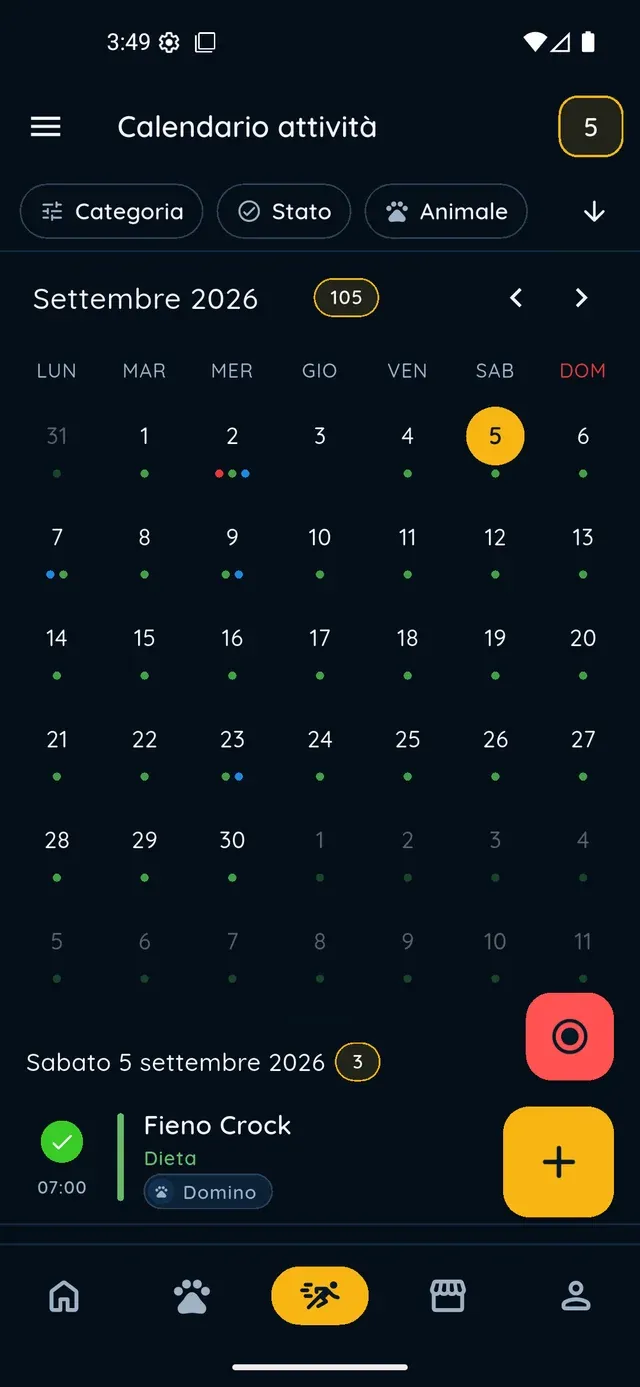
In the Health tab, under Diet, therapies and treatments, you log hay, supplements or a medicine with quantity and frequency. Turn on Recurrent and Create to-dos in activities, and each dose appears in the Activities tab as a reminder to tick off.

A link for whoever looks after your rabbit

From the profile menu you turn on Sharing: a public read-only link with photo, basic details, vaccines with their colour status, diets and treatments. The sitter opens it in a browser, no account needed. Back home, switch it off and the link stops working.

Rabbits

What it means for your day.

  1. Create your rabbit's profile

    In the Pets tab tap the plus button: a photo (optional), name and date of birth, then pick Rabbit from the species grid and, if you like, the breed. Add sex, neutering, colour and microchip; optional fields can stay empty. Creating a pet also works offline.

  2. Log vaccines, weight and body condition

    In the Health tab tap plus and choose Vaccine: type the name, the date of the first dose, boosters with Add dose, the expiry and Set alert. In the Measurements tab tap plus for today's weight, the body condition score and a photo: one measurement per day, editable at any time.

  3. Share the profile before you leave

    Open your rabbit, tap the menu in the top right corner, then Sharing: switch it on and use Share or Copy to send the link to your sitter. Whoever opens it sees the profile read-only, without documents. When you are back, switch sharing off: the link stops working straight away.

Rabbits

Frequently asked questions

Can I log my rabbit's myxomatosis vaccine in a pet rabbit care app?

Yes. In PawsPet the vaccine name is a free text field: type myxomatosis, rabbit haemorrhagic disease or the name your vet gives you. Add the date of the first dose, boosters with Add dose, the expiry date and an alert. The app does not suggest rabbit vaccines by itself: dates and boosters are for you and your vet to decide, the app remembers them.

My rabbit weighs less than 1 kg: how do I enter the weight?

In the Measurements tab tap plus and type the weight in kg with decimals, 0.85 for example: below 1 kg the app shows it in grams. You can log one measurement per day; reopening the same day updates the existing one. There is no delete button, but you can ask the in-app assistant in chat, and it asks for confirmation before deleting.

Will I get an alert before a vaccine expires?

Yes, if in the vaccine form you tap Set alert and pick one of the presets, 1 month before or 1 week before for example, or create a custom one. It arrives as a push notification on your phone and, when tapped, opens the vaccine's details. Notifications must be enabled and an expiry date must be set.

How do I leave my rabbit's details with the sitter while I am away?

Open the pet, tap the menu in the top right corner, then Sharing, and turn on the public read-only link: whoever opens it sees the photo, basic details, vaccines with their colour status, diets and treatments, without the app. If your sitter uses PawsPet you can add them as a collaborator instead, with specific permissions, including editing.

What does a rabbit's profile contain in PawsPet?

Five tabs: Profile, Personal data, Health, Measurements and Activities. In Profile, the Recommended strip flags what is missing, such as the photo, the microchip or a weight older than 90 days, with a completion percentage. Vaccines, diets, allergies and lab tests live in Health; weight and body condition in Measurements; documents in Personal data.

PawsPet

Download PawsPet and create your rabbit's profile

No subscription: the app for pet owners is free. Five steps for the profile, then the first weight and the first vaccine with its expiry date.

Download PawsPet

App screenshots with demonstration or test data.