PawsPet

PawsPet for pet owners

Backyard farm animals app: chickens, goats, sheep and pigs

Chickens, ducks and geese in the coop, two pygmy goats, three sheep and a pot-bellied pig: each has its own age, treatments and due dates. PawsPet is a backyard farm animals app: one profile per animal, a flag for those intended for food production, recurring therapies and parasite treatments you tick off dose by dose. It is not an official register and does not replace your vet: it helps you keep track.

Continue in PawsPet
Activities and reminders — PawsPet

PawsPet

Why it helps

Every species of the yard and the smallholding

In the «Species» step you find Chicken, Sheep, Goat, Pig and Cow right in the grid; under «Show all species» you also get Turkey, Duck and Goose. You can add one or more breeds from the catalogue and, for a species that is missing, pick «Other» and type it in.

A food-production flag on every profile

For every species other than dog and cat, the «Registry» step has the switch «DPA (Intended for Food Production)». Turn it on for laying hens or a pig you are fattening and leave it off for the pet goat: you see at a glance which animals are kept for food.

Recurring treatments with reminders

A parasite treatment every 3 months or a therapy twice a day: under «Diet, therapies and treatments» turn on «Recurrent», set frequency and time, then «Create to-dos in activities». Each dose is an activity to tick off; «Set alert» adds a push notification.

Find any animal in seconds

In the «Position» field write where the animal lives, for example coop or north paddock. Then in the «Search animals» bar filter by name, species, breed, colour or position, switch to the photo grid and jump to a letter with the alphabetical index.

Backyard and farm animals

What it means for your day.

  1. Add every animal in the yard

    «Animals» tab » + button » photo (optional), name and date of birth » species, for example «Chicken» or «Goat» » sex, neutering and the DPA switch » position, booklet and microchip if you have them » «Add document» or «Not now». It works offline too: the app saves on the phone and syncs later.

  2. Set up a recurring treatment

    Open the animal » «Health» tab » «Diet, therapies and treatments» » «Add» » choose «Therapy», name and quantity » turn on «Recurrent» and under «How often is it given?» set frequency and time » «Start date» and «End date» » «Create to-dos in activities» and, if you want, «Set alert».

  3. Tick off each dose from the calendar

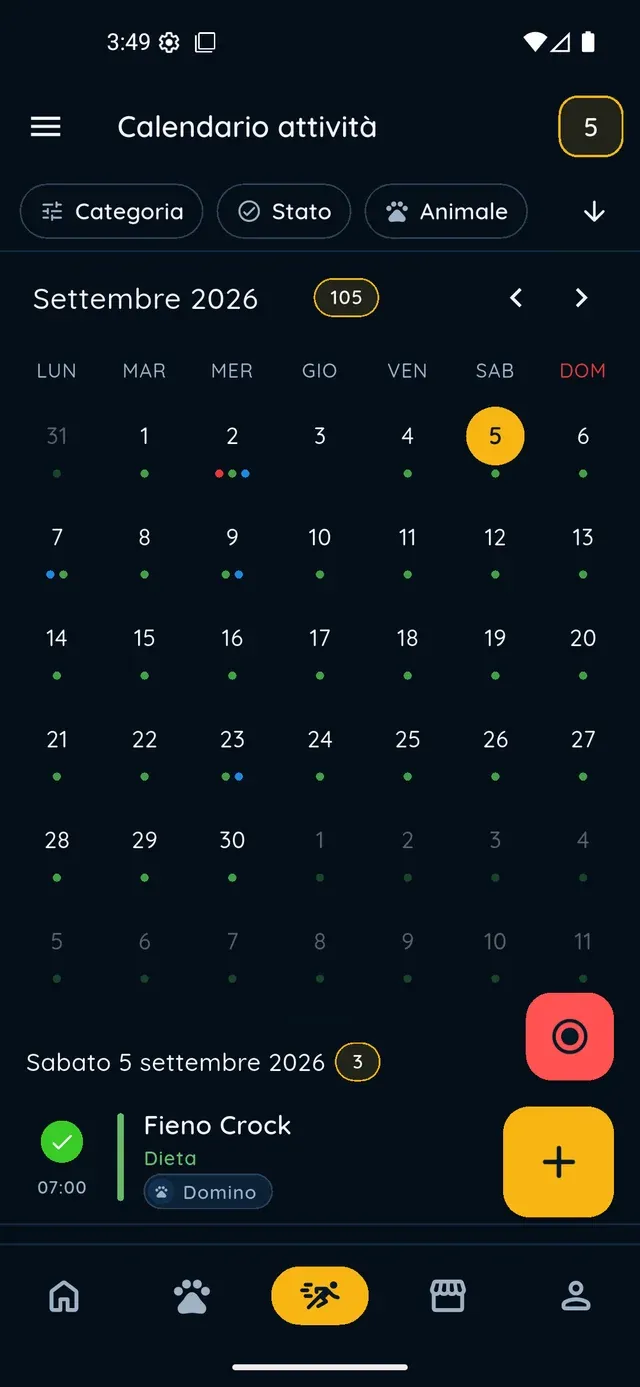
    In the «Activities» tab every scheduled dose appears as a to-do with a checkbox: complete it or skip it straight from the calendar. For routines that involve the whole flock, such as cleaning the coop, create an activity, select all the animals in the «Pets» row and set the frequency under «Repeat».

Backyard and farm animals

Frequently asked questions

Is PawsPet a good backyard farm animals app?

Yes. PawsPet works for every species: chickens, turkeys, ducks and geese, but also sheep, goats, pigs and cows. Each animal has its own profile with the food-production flag, health, documents and activities, and you can add as many animals as you like. It is not an official register and gives no veterinary advice: it collects what you need day to day.

What does the DPA switch on the animal's profile mean?

DPA is the Italian label for animals intended for food production. It is a yes/no switch in the «Registry» step, shown for every species except dog and cat. Use it to mark which animals are kept for food, for example laying hens or a pig you are fattening. It is your own note: any legal obligations stay with the official channels in your country.

How do I set a recurring parasite treatment for my hens with reminders?

Open the hen » «Health» » «Diet, therapies and treatments» » «Add» » «Therapy» » turn on «Recurrent» » set frequency and times » «Start date» and «End date» » turn on «Create to-dos in activities». The entry is per animal: to treat the whole flock at once, create an activity instead, select all the hens and set the frequency under «Repeat».

What is the difference between «Recurrent» and «Set alert» in a therapy?

«Recurrent» describes the dosing schedule and, with «Create to-dos in activities», creates an activity to tick off for each dose. «Set alert» adds a push notification before a due date or a dose, with presets such as «1 day before» or a custom interval. You can use both together.

Does PawsPet replace the official treatment register or livestock records?

No. PawsPet is a tool for your day-to-day organisation: profiles, reminders, documents. Official treatment registers, livestock identification and reporting to the authorities or your vet stay with the channels required in your country. You can, however, upload photos or PDFs of your documents to the profile, so you always have them with you.

PawsPet

Start with your yard today

Download PawsPet for free, add your chickens, goats or sheep in five steps and set up the first recurring treatment: the next doses show up in the calendar on their own.

Download PawsPet

App screenshots with demonstration or test data.