PawsPet

PawsPet for dog owners

The dog care app: profile, health, walks and everyone who helps

PawsPet is a free dog care app that keeps everything about your dog in one profile: details, microchip, vaccines with expiry dates, walks and appointments. You share it with the people who help: family for as long as you like, a dog sitter booked through PawsPet only for the duration of the service. It does not replace your vet: you record what you decide together.

Continue in PawsPet
Activities and reminders — PawsPet

PawsPet

Why it helps

Your dog's profile in five steps

Photo, name and date of birth; then species and breed (more than one if they are a mix), sex and neutering, microchip and health record number. Snap the passport or paper health record right away and it stays attached to the profile. It works offline too.

The app suggests the core vaccines

Under your dog's name, the «Recommended» strip suggests core vaccines never recorded, such as the DHP core vaccine and rabies, and boosters for those about to expire. Tap a suggestion and the form opens with the name filled in: add dates, expiry and an alert.

Walks and outings in the calendar

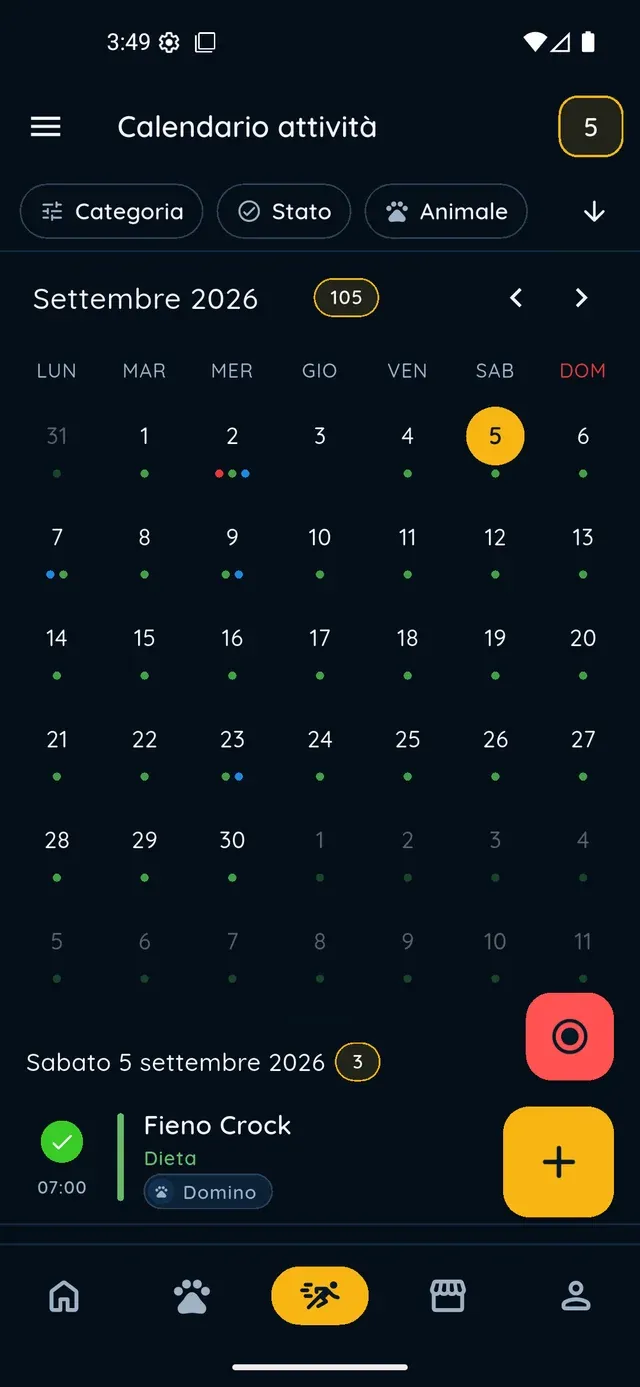
Every walk is an activity: type, dog, time and a reminder; if it repeats daily you create it once and keep a log of every outing. For the dog sitter there is the «Pet sitting & walking» type. Want the route too? Start a GPS recording from the red button.

Helpers see only what they need

A family member gets collaborator access, with separate permissions for details, health and activities, kept until you remove it. A dog sitter booked through PawsPet sees the profile only while the service lasts: when the order ends, access expires on its own.

Dogs

What it means for your day.

  1. Create your dog's profile

    «Pets» tab, + button at the bottom right. Take or choose a photo (you can skip it), enter the name and date of birth; then species and breed, sex and neutering, then microchip and health record number if you have them handy. At the end, upload the passport or health record now, or tap «Not now».

  2. Complete the vaccines from Recommended

    In your dog's «Profile» tab, under the name, scroll the «Recommended» strip: tap the suggestion for the DHP core vaccine or rabies and the form opens already filled in. Enter the date, boosters with «Add dose», the expiry and an alert. Save: the suggestion disappears and the profile fills up.

  3. Log the walks and invite the people who help

    «Activities» tab, + button: choose the type (for example «Free play & walks»), the dog, the time, a reminder and the repeat rule, then «Save». For family, open ⋮ » «Collaborators» » «Add collaborator» from the dog's profile: search the person by name or email and grant the permissions.

Dogs

Frequently asked questions

Is the PawsPet dog care app free?

Yes. PawsPet is free with no subscription: profile, health, activities and sharing cost nothing. You only pay for the services you book in the app, such as a walk with a dog sitter or a grooming session; in-app payments add a small service fee, which you see in the summary before you confirm.

How do I let a family member see my dog?

Open the dog » ⋮ icon » «Collaborators» » «Add collaborator», search the person by name or email (they need a PawsPet account) and confirm with the permissions you want to give: details, health and activities, each as view or edit. Access stays valid until you remove it from the same screen.

Can I share my dog's profile with the dog sitter? For how long can they see it?

Yes, in two ways. If you book them through PawsPet, the permission is tied to the order and lasts as long as the service: when it ends, access expires on its own and, if they reopen the profile, the app tells them until when they could see it and which order it came from. The order chat stays open afterwards. For lasting access, invite them as collaborator.

How do I record a walk with GPS?

«Activities» tab » round red «Start recording» button: choose your dog and a sport type (for example «Walking» or «Trekking with the dog»), then start. Location permission is required. At the end you find duration, distance, speed and the route map in the activity details.

Where do I find a dog sitter or groomer for my dog?

In the app, «Services» tab: search by name or use the filters for service type and area, open the service and book it by choosing your dog from your pets. On the website you find the same professionals in the Services section, city by city.

PawsPet

Download PawsPet and create your dog's profile

Free for owners, on iOS and Android. Five steps for the profile, then Recommended tells you what is missing.

Download PawsPet

App screenshots with demonstration or test data.