PawsPet

PawsPet for pet owners

Aquarium maintenance reminder app: water changes and tests

An aquarium or a pond asks for little, but regularly: water changes, filter cleaning, water tests. PawsPet is an aquarium maintenance reminder app: put these jobs on the calendar with «Repeat» and an alert, log your water tests with the values, and share your fish’s profile when you go away. It does not measure anything and does not know the right values for your tank: it keeps what you record in order.

Continue in PawsPet
Activities and reminders — PawsPet

PawsPet

Why it helps

Water changes and filter that come back on their own

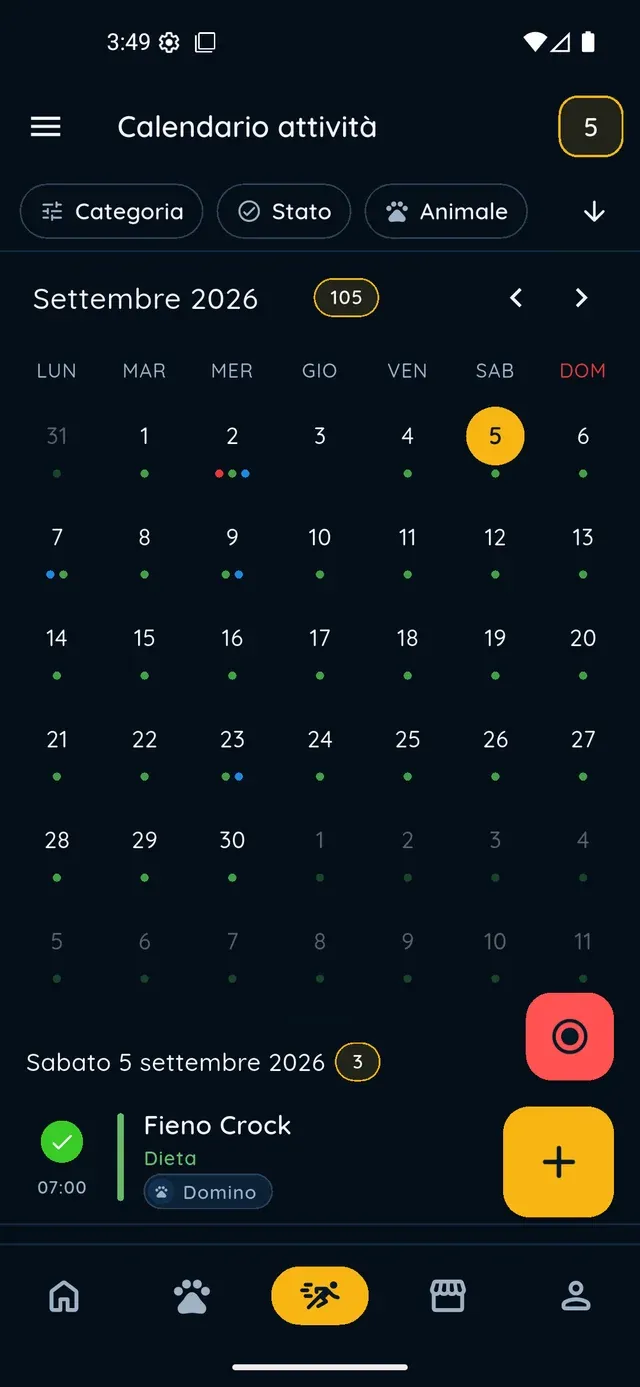
Create a «Water change» activity and set «Repeat» to every week or every N days; for the filter and the lamp choose «Every N months». The app generates the future occurrences in the calendar: tick them off when done, or skip one and leave the rest alone.

Water test values kept in the record

In the «Health» tab you log a «Lab test» named «Water test» and fill in the «Values» table: pH, nitrite, nitrate, GH and KH with unit and reference range. Each test stays in the «History» with its date: open it again whenever you want to compare values.

An alert before the next test

In the test, turn on «Repeat periodically», for example every 2 weeks, and tap «Set alert»: the date of the next test appears right away and you get a push notification beforehand. The same works for any calendar activity, from the row with the bell.

The fish’s profile for whoever feeds them on holiday

From the profile tap ⋮ » «Sharing» and turn on the public link: whoever opens it sees photo, name, basic details and the health summary (including the food, if you recorded it as a diet), with no app and no way to edit anything. When you are back, turn it off.

Fish

What it means for your day.

  1. Create a profile for your fish

    In the «Pets» tab tap + and pick «Fish» from the species grid. Make one profile for each fish you can tell apart (the goldfish, the koi) or a single one for the tank. Name, date of birth and sex are required: if you do not know them, enter your best guess. In «Position» write: aquarium or pond.

  2. Put water changes and the filter on the calendar

    In the «Activities» tab tap +, type «Water change» in the «Name» field, choose a type (for example «Hygiene») and select the profile. Tap «Repeat» and choose «Every N weeks» with the day and time; then the bell and «Set» for an alert, for example «1 day before». Tap «Save».

  3. Log your water tests with the values

    Open the profile, go to «Health», tap + and choose «Lab test». In the picker tap «Other (custom)», type «Water test», set the date and add rows in «Values» with «Add value»: parameter, value, unit, reference. If you like, turn on «Repeat periodically» and «Set alert», then save.

Fish

Frequently asked questions

Is PawsPet an aquarium maintenance reminder app, or is it only meant for dogs and cats?

It works for aquarium and pond fish too: «Fish» is a species in the grid. Profile, repeating activities with alerts, lab tests with a values table and the public link are the same tools every owner uses. There are no aquarium-specific features: the app does not read probes, does not calculate dosing and does not know the right values for your tank.

How do I set a weekly water change reminder?

Create an activity from the «Activities» tab with +, name it «Water change», tap «Repeat» and choose «Every N weeks» with the day and time (or «Every N days»). In the row with the bell tap «Set» and pick the alert, for example «1 day before». You get a notification ahead of time; tick each occurrence off from the circle when done, or skip it with «Ignore».

Can I record pH, nitrite and nitrate as a water test?

Yes, as a lab test: «Health» tab » + » «Lab test» » «Other (custom)», type the test name and fill in the «Values» table (parameter, value, unit, reference). «Water test» is not in the catalogue, so the app does not suggest a schedule or reference values: you enter them yourself. Each test stays in the «History» with its date.

How do I tell whoever feeds the fish on holiday what they should eat?

Open the profile » ⋮ » «Sharing», turn on the link and tap «Share». The public page shows photo, name, basic details and the health summary: if you record the food as a diet in the «Health» tab, it appears there. It does not show the calendar or the documents: to show the water changes too, add the person as a collaborator (they need a PawsPet account).

Does it work for pond fish as well?

Yes: koi and carp are recorded with the same «Fish» species, with «pond» in the «Position» field. Pump cleaning, water level checks and water tests become repeating activities on the calendar, with alerts; a seasonal treatment goes in as an activity with a date and notes. You decide the schedule, the app does not suggest one.

PawsPet

Put the next water change on the calendar

Download PawsPet for free, create a profile for your fish and set up the first repeating activity with an alert. No subscription.

Download PawsPet

App screenshots with demonstration or test data.