PawsPet

PawsPet for pet owners

Puppy and kitten care app: growth, doses and the first months

The first months with a puppy or a kitten are full of dates: first doses, boosters, deworming, weigh-ins. PawsPet, a puppy and kitten care app, keeps them in one profile so you find them when you need them. Your vet sets the schedule: the app does not replace it, it helps you keep track of what you agreed together.

Continue in PawsPet
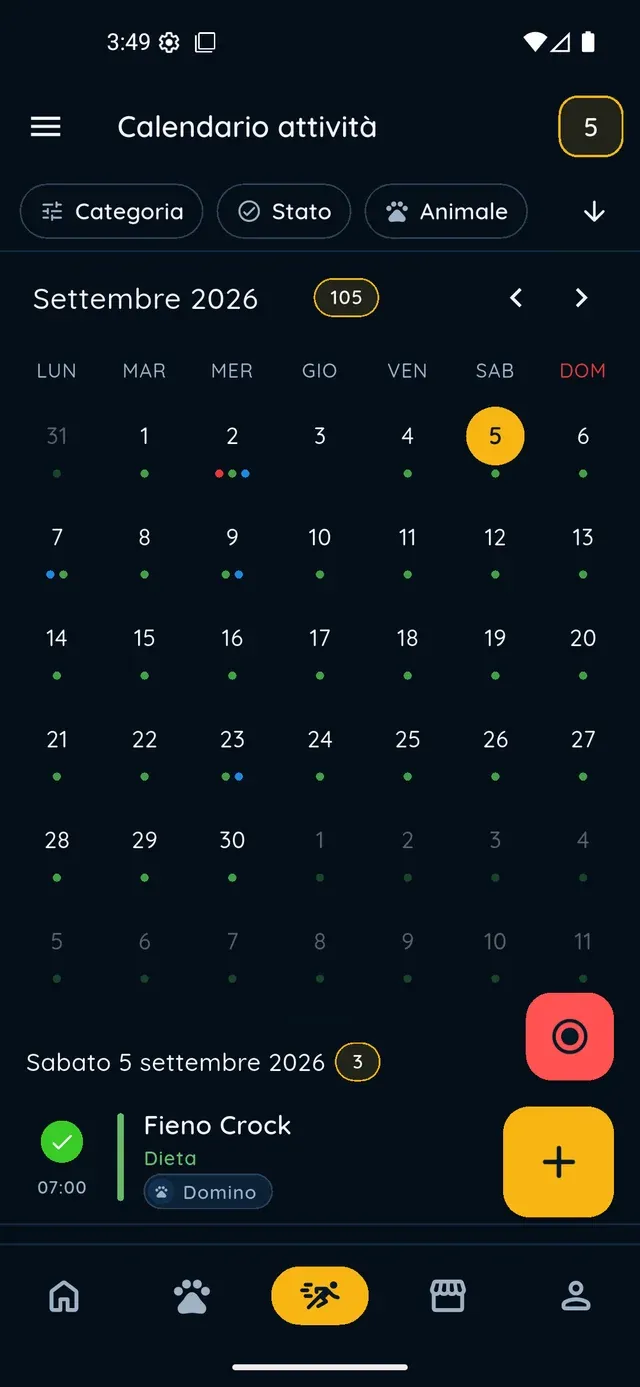
Activities and reminders — PawsPet

PawsPet

Why it helps

Multi-dose vaccines, each booster with its own date

In the Vaccine form, enter the name and the date of the first dose, then add boosters with «Add dose»: each one has its own date. Set the expiry and, if you like, an alert. The vaccine stays green while valid, yellow when about to expire, red afterwards.

Deworming and parasite control as a recurring therapy

Record deworming as a Therapy, switch on «Recurrent» and set the frequency your vet indicated. With «Create to-dos in activities», every dose becomes a task to tick off in the Activities tab, so you always know whether it has already been given.

The weight curve, week after week

In the «Measurements» tab, add the weight every time you weigh them; under one kilo it is shown in grams. The app shows the latest value, the change since the previous weigh-in and the chart over time. You can attach a photo of the day as a growth diary.

What the profile is missing, without thinking about it

In the «Profile» tab, the «Recommended» strip flags core vaccines never recorded, an empty microchip field and a weight not updated in over 90 days. One tap opens the right form, pre-filled. They are suggestions, not reminders: alerts come from «Set alert».

Puppies and kittens

What it means for your day.

  1. Create your puppy's profile starting from a photo

    «Pets» tab » «+»: take or pick a photo, type the name and the date of birth. At the «Species» step, the AI tries to recognise species and breed from the photo and pre-selects them; you confirm or correct. Then sex, neutering, colour and, if you already have it, the microchip number.

  2. Record the first vaccine and the deworming

    «Health» tab » «+» » type «Vaccine»: name, date of the first dose, «Add dose» for the boosters your vet decided, expiry and alert. For deworming choose «Therapy», enter name and quantity, switch on «Recurrent» and set the frequency: each dose can become a task to tick off.

  3. Follow the weight and complete the profile

    In the «Measurements» tab tap «+», enter the weight in kg and save: summary, chart and history update right away. In the «Profile» tab check the «Recommended» strip: if the microchip is missing, or a core vaccine has never been recorded, you see it there and add it with one tap.

Puppies and kittens

Frequently asked questions

Which puppy and kitten care app tells me when to vaccinate?

Your vet sets the vaccination schedule, based on age, species and your puppy's situation. PawsPet does not propose one of its own: you record the doses you agreed, set the expiry and, with «Set alert», get a notification before the booster. The «Recommended» strip flags core vaccines never entered, such as rabies or the core combination vaccine for dogs.

The vaccine has several doses or boosters: how do I record them?

In the Vaccine form use «Add dose» for each booster: every dose has its own date, never earlier than the first one. Set «Expiry / validity date» and, if you like, «Set alert», for example one month before. For the booster of a vaccine already recorded you can also tap the «Boost» pill in «Recommended», when it appears.

How do I set up my puppy's deworming schedule?

«Health» tab » «Diet, therapies & treatments» » «Add» » choose Therapy » switch on «Recurrent» » set frequency and time » «Start date» and «End date». Switch on «Create to-dos in activities» to get a task to tick off at every dose. Product and frequency are decided by your vet according to weight.

Where do I see my kitten's weight chart?

«Pets» tab » your kitten » «Measurements» tab. At the top you find the latest weight with the change since the previous weigh-in, then the line chart, which appears from two weigh-ins onwards, and the full history at the bottom. The app keeps one measurement per day: weigh twice on the same day and you update that one.

Does PawsPet remind me to get the microchip done?

Not as a reminder. If the microchip field is empty, the «Recommended» strip in the «Profile» tab shows a suggestion to fill it in, which disappears as soon as you do. Push alerts are set in the vaccine, therapy and lab test forms with «Set alert». For timing and legal requirements of the microchip, ask your vet.

PawsPet

Start from the first days

Download PawsPet, create your puppy's or kitten's profile and record the first dose: their story builds from there, one date at a time.

Download PawsPet

App screenshots with demonstration or test data.