PawsPet

PawsPet for pet owners

Digital pet health record app for dogs, cats and every animal

PawsPet is a free digital pet health record app for your dog, cat and any other animal you add: vaccines, visits, treatments, lab tests with their values, weight and body condition with a chart over time. Snap a paper report and the AI pulls out the data, which you review line by line before saving. It does not replace the official paper record or your vet: it is your own archive, always in your pocket.

Continue in PawsPet
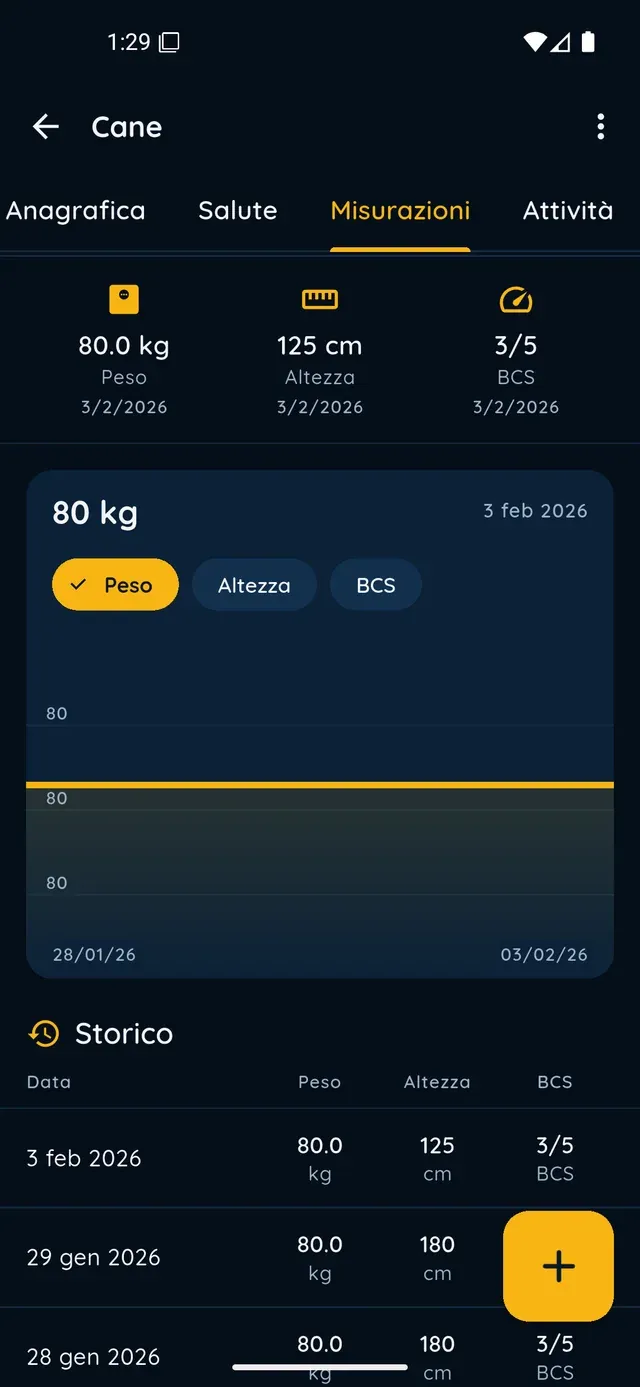
Measurement chart and history in PawsPet

PawsPet

Why it helps

Ten record types, one archive

Medical visit, lab test, vaccine, diet, treatment, illness, injury and other; for horses, ponies and donkeys also hoof trimming and shoeing. Every entry has a date, notes and attachments. «History» keeps them all, expired ones too, with search and filters.

Lab tests with values and a repeat schedule

Pick the test from the catalogue, recommended ones for species and age first, or type your own. Record laboratory, sample and results, as text or in the «Values» table with units and reference range. With «Repeat periodically» you see the next test date.

Weight, height and body condition on a chart

In the «Measurements» tab you log weight in kg, height and Body Condition Score on a 1-5 or 1-9 scale, with a photo if you like. You see the latest value, the change since the last reading, a chart over time and the history. Under 1 kg, weight shows in grams.

The AI reads the report, you confirm it

Upload up to 5 reports (PDF, JPG or PNG): the AI reads them one by one and proposes visits, treatments, vaccines, tests, allergies and measurements. Each row has a checkbox, editable name and date, and a flag if it needs a check: only what you tick is saved.

Digital health record

What it means for your day.

  1. Open the «Health» tab and add an entry

    «Pets» tab » your pet » «Health» tab. Tap the + at the bottom right: in the «Type» step choose one of the ten types, then fill in «Information» (for a visit: date, who performed it, cost and notes) and, if you like, diagnoses and prescriptions; in the «Photos» step attach the reports and save.

  2. Record a lab test with its values

    Choose the «Lab test» type, then tap the «Lab test» field to pick it from the catalogue or type your own under «Other (custom)». Set date, laboratory and sample; paste the results or fill in the «Values» table with «Add value». If it needs repeating, turn on «Repeat periodically» and set the alert.

  3. Let the AI read the report and review the rows

    From the + in the «Health» tab, tap the purple «Analyse report with AI» card. Add up to 5 files with «Choose files» or «Camera» and tap «Analyse with AI». In the review, check the name and date of each row, untick what you do not want and confirm with «Create»: the entries appear right away.

What you can do

Made for

Digital health record

Frequently asked questions

Does the PawsPet digital pet health record app replace the paper record?

No. The paper record and passport remain the official documents: PawsPet is the tidy copy you always have with you. You can photograph them and store them in your pet's profile under «Documents», with expiry date and reminders, but for travel and official purposes you need the original. You or people you authorise enter the data: the app does not certify it.

Can the AI read a vet report so I do not have to type it in?

Yes. «Health» tab » + » «Analyse report with AI»: upload a photo or PDF (up to 5 files, 20 MB each), the AI extracts the data and shows it grouped by type. Review and correct each row, then confirm with «Create». You need a connection and AI features on; each analysis uses AI credits, renewed monthly. If the PDF is unreadable, photograph it.

Will the app tell me when a blood test is due again?

Yes, if you turn on «Repeat periodically» (or accept the schedule the app proposes when you pick the test from the catalogue) and set an alert with «Set alert». In the test details you find «Next on» with the date. You can always change or switch off the proposed schedule: the app suggests it, it does not impose it.

Where do I log my pet's weight, and can I see how it changes?

«Pets» tab » your pet » «Measurements» tab » +: choose the date, enter the weight in kg (decimals allowed), optionally height, body condition score and a photo, then «Save». At the top of the tab you see the latest value with a change arrow, below it the line chart and the full history. One measurement per day: reopen the same day and you update that one.

Does the digital health record work for cats or only for dogs?

It works for every animal you add: dog, cat, horse, rabbit, birds and more. The record types are the same, with two extra entries for horses, ponies and donkeys (hoof trimming and shoeing), and the recommended tests change with species and age. For owners PawsPet is free with no subscription: you only pay for the services you choose to book.

PawsPet

Download PawsPet and keep the record in your pocket

Free for owners, on iOS and Android. Create your pet's profile and add the first health entry in a few steps.

Download PawsPet

App screenshots with demonstration or test data.