PawsPet

PawsPet Business for vets

Veterinary appointment booking app for your practice and clients

PawsPet Business is a veterinary appointment booking app for your practice: you publish visits with a duration, a break and a home-visit radius, the owner books a free slot and you find everything in one agenda, next to the appointments taken over the phone. It is not clinical software: records and reports stay in the system you already use. No subscription: a fee only on orders paid in the app.

Continue in PawsPet Business
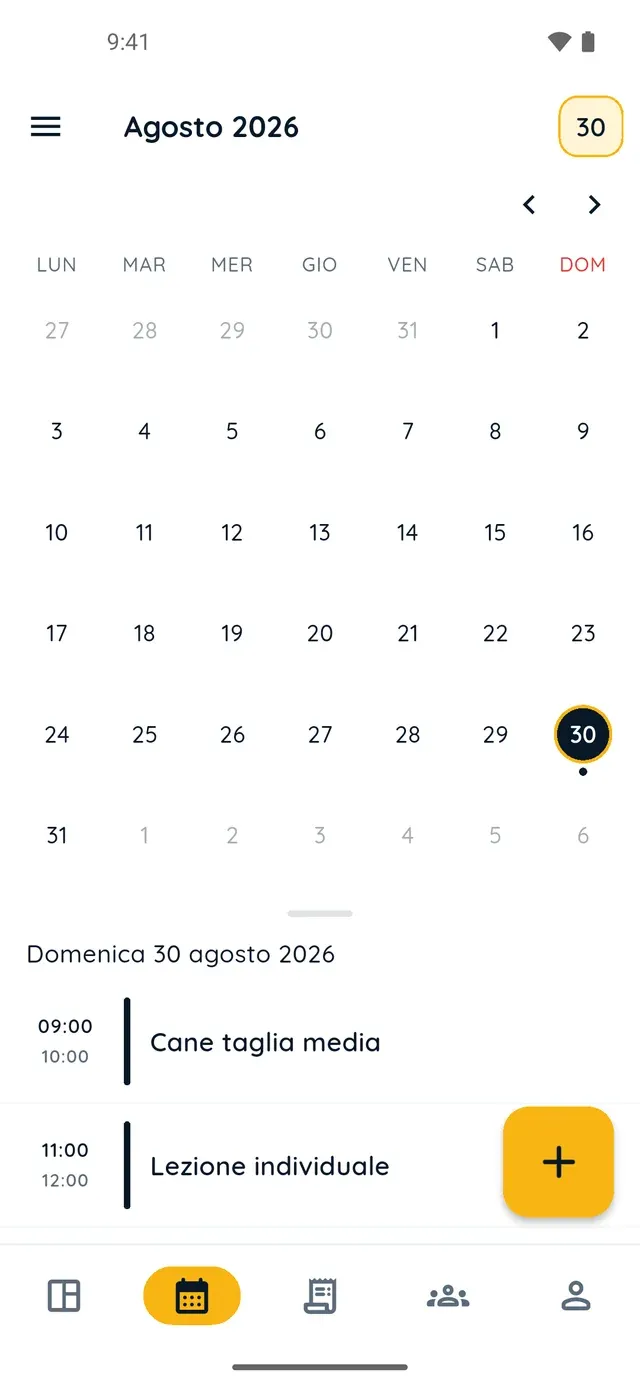
Monthly calendar in PawsPet Business

PawsPet Business

Why it helps

Slots, duration and a break between visits

On each option of your «Veterinary» service you set «Appointment duration» (15 minutes to 4 hours), «Maximum capacity per time slot» and «Break between appointments». The slots offered to clients follow your hours and open every 10, 15, 20, 30 or 60 minutes.

Home visits within a radius you decide

Under «Geographic availability» choose «At the venue», «Home visit» or «Venue and home». For home visits pick «Anywhere» or a «Maximum distance from the location» in kilometres, so you offer house calls only in the area you can cover. Fixed or hourly price.

Phone calls land in the same agenda as online bookings

Online bookings arrive in the «Orders» tab with a notification and, if they have a time, show up in the agenda. For someone who calls, tap «+» in the agenda: client, pets and option, and the duration fills in by itself. If two slots overlap, the app tells you.

Profile verified with Stripe, payouts to your account

The «Profile verified by PawsPet» tick appears once you complete Stripe's identity and payment checks inside the app: ID document, details and bank account. It does not certify registration. From then on you are listed and paid online; the agenda works anyway.

Veterinarians

What it means for your day.

  1. Publish a «Veterinary» service with duration, break and radius

    Open «My services» » «+». Under «General» choose the «Veterinary» type and a name, then upload a photo. Under «Prices and options» tap «Add option»: price, «Appointment duration», «Break between appointments». Under «Geographic availability» choose venue or home visits and a radius, then «Publish».

  2. Accept bookings and add phone appointments to the agenda

    A booking arrives in the «Orders» tab: open it and tap «Accept». For a client who phones, in the «Agenda» tab tap «+», «Pick a client» (or «New client»), select their pets and the service option, set «Start» and «Save». After the visit, tap the appointment and choose «Done» or «No-show».

  3. Invite the client and record vaccines and visits for their pet

    From the «Clients» tab open a client marked «Not registered», tap «Invite» and «Share» the link by WhatsApp or SMS: they open it in PawsPet, link their pet and tap «Accept». Then open the pet, «Health» tab, «Add» on the Vaccines block: name, date, expiry and notes, then «Save».

Veterinarians

Frequently asked questions

How much does the PawsPet Business veterinary appointment booking app cost?

No subscription and no monthly fee: services, agenda, clients and pet records are free. PawsPet keeps a share («PawsPet share» in the order details) only on orders the client pays in the app; the «You receive» line always shows the net amount you get. New profiles take payments online only: in-person payments are not available.

Is PawsPet Business clinical software for a veterinary practice?

No. It gives you an agenda, online bookings, a client list and payments. On a client's pet you record vaccines, treatments, visits, weight and notes with a date and expiry, not a clinical record: reports, prescriptions and invoicing stay in the software you already use. You can attach a photo to an entry, but it stays in your record: the owner never sees it.

Does the «Profile verified» tick certify my professional registration?

No. The check is Stripe's, on identity and payments: ID document, personal details and a bank account for payouts, filled in through the form that opens inside the app from «Profile» » «Verification». PawsPet does not currently verify professional registers or health authorities: the legal requirements to practise remain yours. Without it you are not listed.

Can I read the health record of a client's pet?

Only with the owner's consent. If they add you as a collaborator with «View» on Health, you see their pet in the PawsPet app under «Shared with me», read-only, until they remove you. When they accept your invitation they also find a checkbox, off by default, that opens the health record to you; without it, you work on the client record you keep yourself.

Does the owner see what I record about their pet?

Yes, if they use PawsPet and accepted your invitation: in their pet's profile, «Profile» tab, section «Recorded by professionals», they find the type, name, date, expiry and note. They can add a note of their own but cannot edit your data. They get no notification and see neither photos nor the weight value: for those there is the order chat.

PawsPet Business

Bring your veterinary practice to PawsPet Business

Download the app, create your profile with the «Veterinary practice» category and publish your first bookable visit. No subscription: a fee only on orders paid in the app.

Download PawsPet Business

Coming soon onApp StoreDownload onGoogle Play

PawsPet Business for iOS is coming soon to the App Store. App screenshots with demonstration or test data.