PawsPet

PawsPet Business for boarding

Free dog boarding software for kennels and catteries

PawsPet Business is free dog boarding software for kennels and catteries: you publish a stay with a per-day price, the owner picks arrival and departure and books online, and you see orders and closures in one calendar. During the stay you record activities, weight and notes on the guest pet. No subscription: a fee only on orders paid in the app. It does not replace the licences you need to run a boarding business.

Continue in PawsPet Business
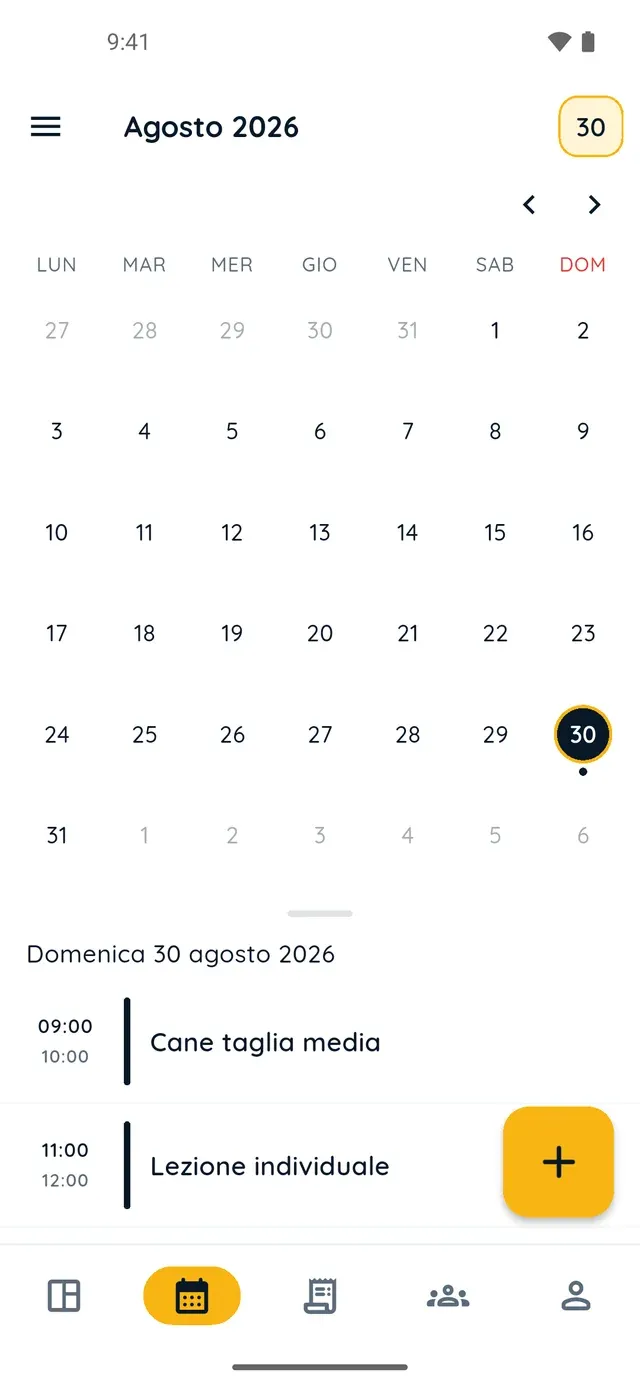
Monthly calendar in PawsPet Business

PawsPet Business

Why it helps

Per-day stays with arrival and departure chosen by the owner

In a «Boarding» service you add a «Per day» option: the price applies to each day and the client picks a start and an end date and time. Limit it to dogs, cats or other species, multiply the price by the number of pets and cap the pets per booking.

Maximum capacity and closures, so nobody overbooks you

On each option you set the «Maximum capacity per time slot», the number of pets or orders you accept in the same slot. For holidays, full periods or closures use «Block time» in the calendar: during that interval you get no bookings from the marketplace.

Orders and appointments in the same calendar

Orders with a set date appear in the calendar as blocks coloured by status, with service, client and pets: tap one to open the details and accept it from there. In the same calendar you create appointments by hand, such as a meet-and-greet before the stay.

Record activities, weight and notes during the stay

On the pet's record you log activities, weight, treatments and notes with a date and due date. If the owner uses PawsPet and is linked to your client record, they see type, name, date and note under «Recorded by professionals». Photos go in the order chat.

Pet boarding

What it means for your day.

  1. Publish the stay as a «Boarding» service with a per-day price

    In «My services» tap «+». In «General» choose the «Boarding» type (or «Day care»), in «Images» add a photo. In «Prices and options» tap «Add option», choose «Per day» and set the price, the species allowed and the «Maximum capacity per time slot». Then location, hours and «Publish».

  2. Mark closures and full periods, then follow orders from the calendar

    In the «Agenda» tab open ☰ » «Closing hours» » «Block time»: turn on «All day», set «Start» and «End», add a «Reason» if you like and tap «Block». Bookings arrive in the «Orders» tab and, if they have a date, in the calendar too: tap the block to open the order and accept it.

  3. Record the stay on the guest pet's record

    From the «Clients» tab open the guest pet and in the «Health», «Measurements» or «Activities» tab tap «+»: pick the type (Activity, Weight, Treatment, Note), enter name, date and notes, then «Save». Everything also lands in the client's history. Photos of the stay go through the order's «Chat» tab.

Pet boarding

Frequently asked questions

How much does PawsPet Business dog boarding software cost?

No subscription and no monthly plan: services, calendar, clients, pet records and orders are free. PawsPet keeps a fee only on orders the client pays in the app; the «You receive» line in each order shows the net amount you get. For new profiles, payments are online only: in-person payments are not available.

How does the per-day price for a stay work?

In a «Per day» option the price applies to each day of the stay: the client picks a start date and time and an end date and time when booking. If you turn on «Multiply price by number of pets», the total also follows how many pets they bring, up to the maximum per booking you set. An option's price must be greater than zero.

How do I avoid bookings when the kennel is full or closed?

Two tools. On each option, «Maximum capacity per time slot» sets how many pets or orders you accept in the same slot. For a whole period, in the «Agenda» tab open ☰ » «Closing hours» » «Block time», turn on «All day» and set the dates: during that interval you receive no bookings from the marketplace. Remove it with «Delete block».

Does the owner see what I record on their dog during the stay?

Yes, if they use PawsPet and are linked to your client record (they booked in the app or accepted your invite): in their pet's profile, under «Recorded by professionals», they find type, name, date, due date and note. They can add a note, not edit your data. They get no notification and see neither photos nor the weight value: use the order chat for those.

Can I use PawsPet Business to start a dog boarding business?

It covers the management side: a profile in the «Boarding» category, services with a per-day price, online bookings, calendar, clients and payouts through Stripe. It does not replace legal requirements: licences, permits, premises and records are still up to you. To appear in searches you need Stripe verification.

PawsPet Business

Bring your kennel or cattery to PawsPet Business

Download the app, create a profile in the «Boarding» category and publish your first stay with a per-day price. No subscription: a fee only on orders paid in the app.

Download PawsPet Business

Coming soon onApp StoreDownload onGoogle Play

PawsPet Business for iOS is coming soon to the App Store. App screenshots with demonstration or test data.