PawsPet

PawsPet Business for groomers

Free dog grooming software for your salon

PawsPet Business is free dog grooming software for salons and mobile groomers: a calendar with the length of each service and a buffer between pets, a price list per pet and per species, and a record for every dog and cat with its grooming history and photos. No subscription: PawsPet keeps a fee only on orders paid in the app. To appear in the marketplace and get paid online you complete Stripe verification.

Continue in PawsPet Business
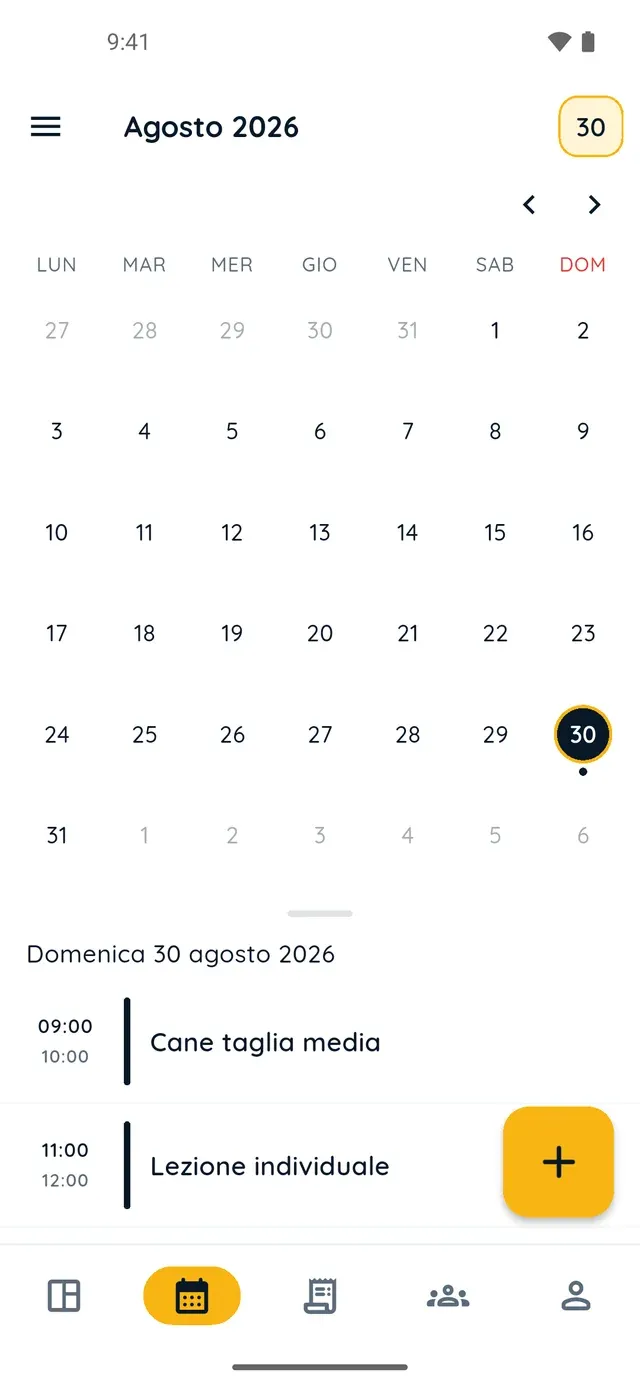
Monthly calendar in PawsPet Business

PawsPet Business

Why it helps

Slots that fit your work: duration, buffer and capacity

For each option in your price list you set «Appointment duration», «Break between appointments» and «Maximum capacity per time slot»: clients only see slots you can really cover, with time to clean the table between one pet and the next.

Per-pet pricing, limited to the species you groom

With the «Per pet» price type the price applies to every animal brought in; in each option you choose the species allowed (dog, cat, rabbit and more) and a maximum number of pets per booking. For sizes you create separate options, each with its own price.

Grooming history with photos in the client's record

On each client's pet you log a «Grooming» entry with date, note and photo: it stays in the pet's history even if the client has no app. If they are linked to PawsPet, they see the entry and your note under «Recorded by professionals»; the photo stays with you.

Holidays and closures that block online bookings

With «Block time» you mark holidays, extra closures or a half day: nobody can book from the marketplace in that window and the block appears hatched in your calendar. If you create an appointment that overlaps, the app warns you but leaves the decision to you.

Groomers

What it means for your day.

  1. Create your profile in the «Grooming» category

    Download PawsPet Business and sign in with your PawsPet account: «Become a merchant» starts on its own. In the «General» step pick the «Grooming» category, then fill in details, contacts, address and hours and tap «Create profile». Calendar and clients work at once; Stripe verification can wait.

  2. Publish your services with options, duration and buffer

    From «My services» » «+» a service takes six steps: type «Grooming», name and description, at least one photo, then in «Prices and options» the options (bath, cut, treatment) with price, species, duration, buffer and capacity; finally where you work, your hours, the slot interval and «Publish».

  3. Work from the calendar and log every groom

    Bookings paid in the app show up in the «Agenda» tab next to the appointments you create with «+» by picking client, pets and option. Then mark the appointment «Done» and log the «Grooming» in the pet's record with a note and photo: clients on PawsPet find it in their pet's profile.

Groomers

Frequently asked questions

How much does the PawsPet Business dog grooming software cost?

There is no subscription and no monthly plan: calendar, clients, pet records, price list and statistics are free. PawsPet keeps a fee only on orders the client pays in the app; the «You receive» line in each order shows the net amount you get. For new profiles, payments are online only: in-person payments are not available.

Can I charge per dog and price by size or species?

Yes. With the «Per pet» price type the price applies to every animal brought in, and each option can be limited to certain species: dog, cat, rabbit and more. There is no dedicated field for size: you create separate options, for example «Bath, small dog» and «Bath, large dog», each with its own price and duration.

How do I mark holidays so nobody can book?

«Agenda» tab » menu at the top left » «Closing hours» » «Block time»: switch on «All day», set the dates, add a reason if you like and tap «Block». In that window you receive no bookings from the marketplace and the block appears hatched in grey in your calendar; you can delete it any time from the same list.

Does the owner see the photo of the groom I logged?

No. If the client is linked to their PawsPet account, they see the «Grooming» entry with its name, date and your note in their pet's profile under «Recorded by professionals», and they can add a note of their own. The photo stays in your client record: if you want to send it, use the order chat.

Do my clients need the PawsPet app to book?

To book and pay online they need a PawsPet account: the client picks the service in the app or from the link to your public profile, which you can share and which opens without the app. For clients not on PawsPet you create the record in «Clients» and the appointment in «Agenda»: history and records work the same, and you can invite them later with «Invite».

PawsPet Business

Open your grooming software in PawsPet Business

Download the app, sign in with your PawsPet account and create your profile in the «Grooming» category. No subscription: a fee only on orders paid in the app.

Download PawsPet Business

Coming soon onApp StoreDownload onGoogle Play

PawsPet Business for iOS is coming soon to the App Store. App screenshots with demonstration or test data.