PawsPet

PawsPet Business for dog trainers

The dog trainer app: lessons, programmes and clients

PawsPet Business is the dog trainer app for training, obedience and behaviour consultations: you publish your lessons, clients book online and everything lands in your agenda. On each dog's record you note how the programme is going. No subscription: PawsPet keeps a fee only on orders paid in the app. The verified badge covers identity and payments through Stripe, not your qualifications.

Continue in PawsPet Business
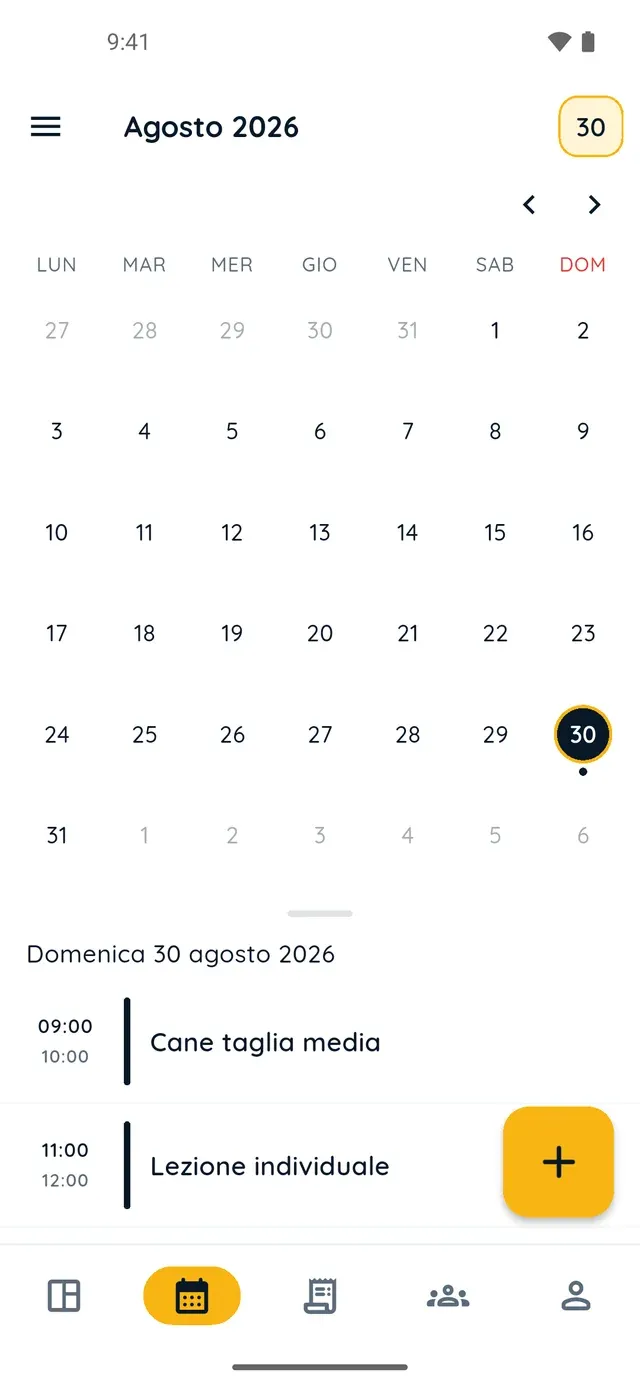
Monthly calendar in PawsPet Business

PawsPet Business

Why it helps

Three service types: training, obedience, behaviour

In «My services» you pick the type: «Training», «Obedience training» or «Behavioural consultation». Each type is a filter in the PawsPet app search, so an owner looking for an obedience class finds you. Name, description and photos are yours to write.

One-to-one lessons per dog, group classes per person

For a one-to-one lesson create a «Per pet» option: the client picks their dog and each dog is a separate booking. For a group class use «Per person» and set the «Maximum capacity per time slot»: once the places are taken, the slot can no longer be booked.

A lesson agenda with states: scheduled, done, no-show

Online bookings and sessions you add by hand share one agenda. Every appointment starts as «Scheduled» and you close it with «Done», «No-show» or «Cancel appt», so there is a record of who did not turn up. If two commitments overlap, the app warns you.

Notes and photos on each dog's progress

On the client's dog record you log activities and notes with date and photo: what you worked on and what to practise at home. If the owner is linked to you on PawsPet, they see type, name, date and note under «Recorded by professionals». Photos stay with you.

Dog trainers and behaviourists

What it means for your day.

  1. Publish the lesson as a service with its price options

    Open «My services» and tap «+». In the «General» step choose the type (training, obedience or behavioural consultation), give it a name and upload a photo. In «Prices and options» add a «Per pet» option for one-to-one lessons or «Per person» for a class. Then location, hours and «Publish».

  2. Follow bookings and lessons from the agenda

    Bookings arrive in the «Orders» tab: you accept them or propose a change and, if they have a date, they also show in «Agenda». There you add other sessions by hand with «+», choosing client, dog, service and time. After the lesson, tap the appointment and mark it «Done» or «No-show».

  3. Log progress on the dog's record and reward clients who continue

    From the «Clients» tab open the client's dog, «Activities» tab, and tap «+»: type «Activity» or «Note», name, date, notes and a photo if needed, then «Save». For a discount to clients booking several lessons go to «Profile» » «Promo codes» » «New code»: value, «Max per user» and expiry.

Dog trainers and behaviourists

Frequently asked questions

How much does the PawsPet Business dog trainer app cost?

No subscription and no monthly plan: the management tools (services, agenda, clients, dog records and orders) are free. PawsPet keeps a «PawsPet share» only on orders the client pays in the app; in the order detail the «Receive» line shows the net amount you get. For new profiles payments are online only: in-person payments are not available.

Can I sell a group class with online booking and limited places?

Yes. Create an option with «Price type» «Per person» and set the «Maximum capacity per time slot», that is how many orders you accept in the same slot. The client adds participants with «Add person», giving only the details you asked for, and each person becomes a booking. When the slot is full, that time no longer appears among the free ones.

Can I sell a package of ten lessons?

There is no package with remaining lessons to count down: every booking is one lesson with a date and time. To reward clients who keep going, create a promo code with «Max per user» equal to the number of lessons: the client enters it at each booking. A «Custom» option such as «10-lesson package» shows in the price list but cannot be booked in the app.

Does the owner see the notes I write after a lesson?

Yes, if they are linked to your client record: this happens when they book you on PawsPet or accept your invitation. On their dog's record, under «Recorded by professionals», they find type, name, date, expiry and note of each entry; they can add a note of their own, not edit your data. They get no notification and do not see the photos: use the order chat.

How do I find new clients as a dog trainer?

After Stripe verification your profile appears in the PawsPet app search, filtered by service type and distance, and on this website's city service pages; from your «Public profile» you share your shop link. Clients without the app can be added under «Clients» and invited with a link. The verified badge covers identity and payments, not a register.

PawsPet Business

Bring your lessons to PawsPet Business

Download the app, create your profile in the «Training» category and publish your first training service. No subscription: a fee only on orders paid in the app.

Download PawsPet Business

Coming soon onApp StoreDownload onGoogle Play

PawsPet Business for iOS is coming soon to the App Store. App screenshots with demonstration or test data.