PawsPet

PawsPet Business for pet professionals

Online booking system for pet groomers and sitters

The online booking system for pet groomers and sitters in PawsPet Business is built from your settings: a price list with price types, working hours, slot interval, travel radius and closures. Clients find your service on the website, in the PawsPet app or through your profile link, pick a free time and book: you receive an order to accept. You need a business profile, a published service and Stripe verification.

Continue in PawsPet Business
Services and prices in PawsPet Business

PawsPet Business

Why it helps

A price list that quotes for you

For each service you create one or more options with a name, a price and a price type: fixed, per person, per pet, hourly, daily, weekly, monthly or yearly; per km only for Pet taxi. Clients see the total calculated as they configure the option, before paying.

Slots that follow your hours, not the other way round

You set your profile's working hours and how often slots open: every 10, 15, 20, 30 or 60 minutes. A service can have its own hours and interval. Duration, capacity per time slot and the break between appointments decide which times clients see as free.

On site, at home or both, within your radius

For each service you choose whether you provide it on site, at the client's home or both. If you travel, you cover any distance or set a maximum distance from your premises: home visits can only be booked to an address inside that radius.

Holidays and closures without surprise bookings

From the agenda you block a time or a whole day, with an optional reason: during that period you receive no bookings from the marketplace and the block shows up hatched in grey. A full slot stays visible to clients but crossed out: you are working, just busy.

Online booking

What it means for your day.

  1. Create the service with the 6-step guided form

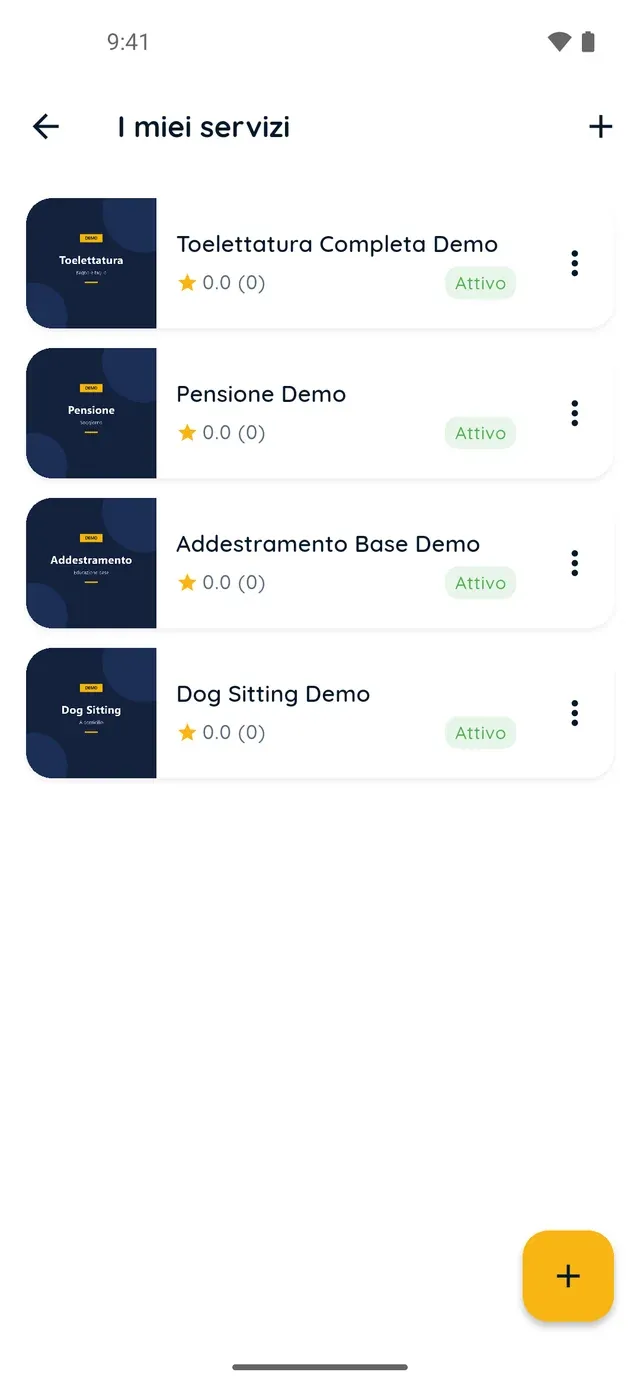
    In the Profile tab open My services and tap +. Choose the service type and name, upload at least one photo, then under Prices and options add at least one option with price, price type, duration, capacity per slot and break. Say where you provide it, set the hours and publish it as Public.

  2. Set your working hours and the slot interval

    In the Profile tab open Working hours: choose your time zone, the slot interval (30 minutes unless you change it) and, for each day, closed, open all day or one or more time bands. A service can follow the profile hours or use custom hours with an interval of its own.

  3. Check the preview and manage bookings

    In My services tap a card: you see the page exactly as a client does, with Edit in place of Book now. Bookings land in the Orders tab as Waiting for the merchant: you accept or reject them, and those with a set time also appear in the Agenda, where you block holidays and closures.

Online booking

Frequently asked questions

How much does the online booking system for pet groomers and sitters cost?

No subscription and no monthly fee. PawsPet keeps a share only on orders paid in the app: you see it line by line in each order's detail, under Your earnings, next to the net amount you receive. The payout starts when the client confirms the service was delivered, or on automatic confirmation.

Can I decide how many minutes apart booking slots open?

Yes. In the Profile tab open Working hours and choose the slot interval: 10, 15, 20, 30 or 60 minutes (the default is 30). If one service needs a different rhythm, in its form, Working hours step, set a slot interval for that service only. Appointment duration and break are set on the option instead.

Can I charge per pet, per hour or per day?

Yes, with the option's price type. Per pet creates one order line for each pet the client selects and lets you set which species are allowed. With hourly and daily pricing, for example for boarding, the client picks a start and an end. Monthly and yearly ask how many units they want, not dates. Custom is information only: it cannot be booked in the app.

How do I mark holidays so nobody books on those days?

In the Agenda tab open the menu, then Closing hours and Block time; turn on All day, set the dates and a reason if you like, then confirm. During that period you receive no bookings from the marketplace. For a short block, long-press a free time in the Day view. Tap a block to delete it.

Do clients just book, or do I have to confirm?

You decide. Every booking arrives in the Orders tab as Waiting for the merchant: with Accept you can add a message, with Reject you must give a reason of at least 30 characters. If you do not reply before the deadline shown in the order, it is cancelled automatically. Clients cannot message you before booking: the chat starts with the order.

PawsPet Business

Download PawsPet Business and publish your first service

Sign in with your PawsPet account, create your business profile and publish your price list with your hours: clients book from the website and the PawsPet app. No subscription: a share only on orders paid in the app.

Download PawsPet Business

Coming soon onApp StoreDownload onGoogle Play

PawsPet Business for iOS is coming soon to the App Store. App screenshots with demonstration or test data.