
PawsPet

PawsPet for wildlife rescue centres

Wildlife rescue centre animal records: one profile per animal

PawsPet is a free wildlife rescue centre animal records app for the day-to-day work: one profile per animal in care, even for a species that is not on the list, weight and BCS over time, therapies with a reminder for every dose, photos and notes that the next shift reads straight from the profile. It is the app built for pet owners: it does not replace official registers or your centre's procedures.

Continue in PawsPet
Activities and reminders — PawsPet

PawsPet

Why it helps

Species that are not on the list

In the «Species» step you find Poultry, Snake, Lizard and Turtle, with «Other» at the bottom: pick it and type the «Custom type», for example hedgehog or buzzard. In the «Animals» list you then search by custom type, name or «Position» (enclosure or aviary).

Weight and BCS with history and chart

In the «Measurements» tab you record weight (in grams under 1 kg), height and BCS on a 1-5 or 1-9 scale, with a photo of the day and a note. Each row shows the change from the previous reading and the chart follows the animal through its rehabilitation.

Therapies with a reminder for every dose

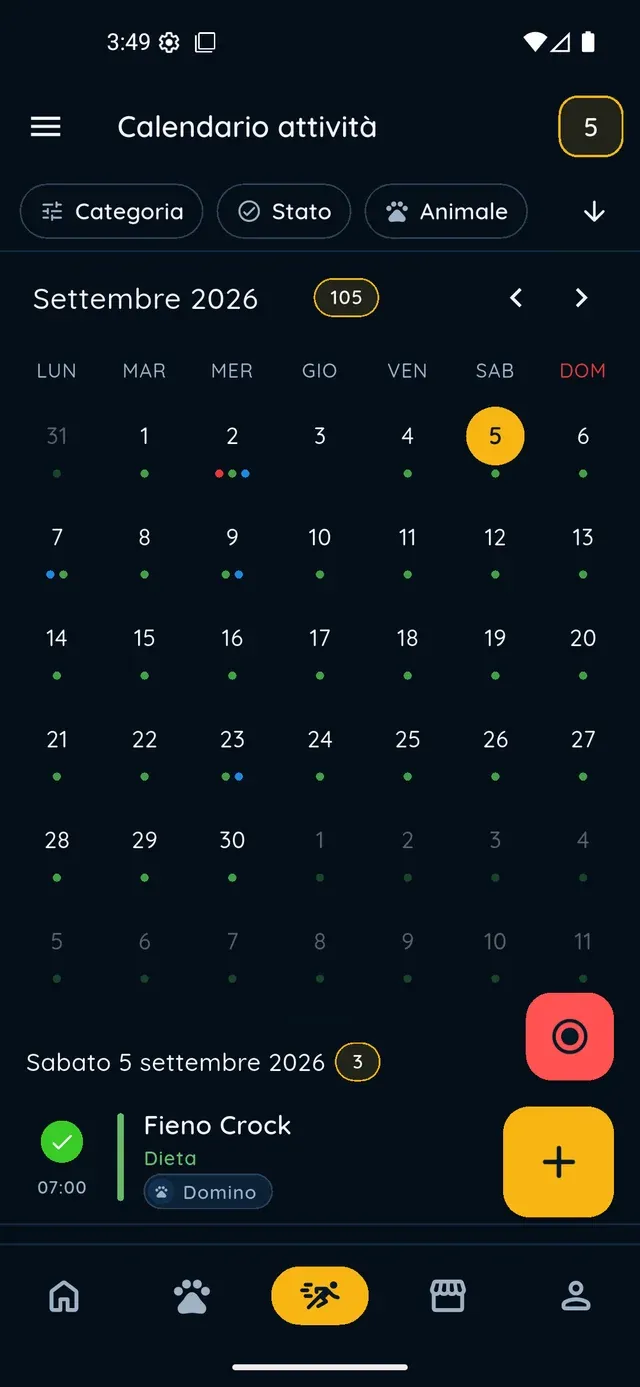
Under «Diet, therapies and treatments» enter name and quantity, turn on «Recurrent» and set frequency and times; with «Create to-dos in activities» every dose becomes an activity to tick off. «Set alert» adds a push notification before the dose.

Photos and notes for the next shift

From the «+» in the «Health» tab, the last step «Photos» attaches photos or PDFs to any entry: reports, X-rays, the wound at intake. Write observations in the «Notes» of an activity such as «Symptom monitoring»: whoever opens the profile next finds them there.

Wildlife rescue centres

What it means for your day.

  1. Register the animal at intake

    Open «Animals» and tap «+». Take a photo or «Skip the photo», enter a name (an intake code works too) and a date of birth, estimated if unknown. Choose the species or «Other» with a «Custom type», then sex, «Position» with the enclosure and the microchip if there is one. It works offline too.

  2. Set weight and therapy

    Open the profile » «Measurements» » «+»: date, weight, BCS, photo and notes » «Save». Then «Health» » «Diet, therapies and treatments» » «Add» » «Therapy»: name and quantity, «Recurrent» with frequency and times, «Start date» and «End date», «Create to-dos in activities» and optionally «Set alert».

  3. Tick off doses and leave notes for the next shift

    In the «Activities» tab every scheduled dose appears as a to-do with a checkbox. For observations tap «+», choose a type such as «Symptom monitoring», select the animals in the «Pets» row and write your «Notes»; with «Repeat» you schedule the check at a fixed interval.

A recovery journey with shared information

For wildlife, the aim is rehabilitation and, where possible, a return to nature. Use profiles, activities and documents to organise information; clinical assessments and release decisions remain with the professionals and the centre.

Shared family care

Wildlife rescue centres

Frequently asked questions

Is PawsPet a good wildlife rescue centre animal records app?

For the daily work, yes: one profile per animal in care, weight and BCS with a chart, therapies with reminders, photos and notes. It is the app built for pet owners, free and with no subscription. It is not an official intake register, it does not handle paperwork with the authorities and it does not decide on release: those stay with your centre.

How do I record a wild species that is not on the list?

In the «Species» step scroll down to «Other» and type the «Custom type», for example hedgehog or buzzard: it is required. The grid already includes Poultry, Snake, Lizard, Turtle and Rodent, plus Bird and Reptile under «Show all species». The search in the «Animals» list also filters by custom type, so one word brings up every hedgehog you have.

Date of birth and sex are required: what if I do not know them?

Yes, the wizard does not continue without a date of birth and a sex, because it was designed for owned pets. For a wild animal enter an estimate and correct it once you know: from the profile, ⋮ icon » «Edit», at any time. Microchip, booklet and «Position» are optional.

Can I weigh an animal more than once a day?

The app keeps one measurement per calendar day: reopening the same day updates the one already saved rather than creating a second one. If you weigh twice, note the second value in the measurement's «Notes». Under 1 kg the weight is shown in grams, handy for birds and small mammals; decimals are accepted.

Can staff and volunteers work on the same profile?

Yes, if they have a PawsPet account: from the animal's profile, ⋮ icon » «Collaborators» » «Add collaborator», and grant View or Edit on Health and Activities, animal by animal. Each person finds their animals under «Shared with me» and works from the profile; access stays until you remove it. There is no shared calendar for the facility.

PawsPet

Try PawsPet with your next intake

Download PawsPet, create the first profile with «Other» and a custom type, record the weight and set up the therapy. It is free, and profiles, measurements and activities save even without a connection.

Download PawsPet

App screenshots with demonstration or test data.