
PawsPet

PawsPet for dog shelters

Free dog shelter management software, right on your phone

PawsPet is free dog shelter management software that lives on your phone, not on an office computer: one record per dog with photo, kennel and microchip, vaccines with expiry dates and alerts, volunteers as collaborators on individual dogs, free adoption listings straight from the record. No subscription. Publishing in the shelter's name with «Shelter» status also needs a PawsPet Business profile.

Continue in PawsPet
Activities and reminders — PawsPet

PawsPet

Why it helps

One record per dog, from kennel to microchip

Take a photo and the app suggests species and breed; then add name, date of birth, sex, neutering, microchip and health book number. Write the kennel in the «Position» field: in the «Pets» list you search by name, breed, colour or position, as a list or grid.

Health expiry dates and documents in the right place

In the «Health» tab you record vaccines with an expiry date and an alert before the booster, plus treatments, illnesses and injuries, all kept in the history. Passport, health book and certificates go under «Documents», with expiry and reminders, shelter only.

Volunteers with the right permissions, dog by dog

Invite anyone with a PawsPet account as a collaborator on a single dog and decide what they can view or edit: Health, Activities, basic details. The volunteer finds their dogs under «Shared with me» and works from the record; when they stop, you remove access.

One activity for several dogs, adoption from the record

A walk, a treatment or grooming is logged once for several dogs. When a dog is ready, tap «Offer for adoption» in its menu: the listing is free, people find it on the PawsPet website and through links you share. Once handover is confirmed, the record follows.

Dog shelters

What it means for your day.

  1. Register the dogs in your care

    Download PawsPet, open the «Pets» tab and tap «+». In five steps you add a photo (the app suggests the breed), name and date of birth, species, sex and neutering, then «Position» with the kennel and the microchip number. At the end you can upload the passport or health book, or tap «Not now».

  2. Invite volunteers on the dogs they look after

    Open the dog, tap the menu at the top, then «Collaborators» » «Add collaborator». Search for the volunteer by name or email, choose the permissions (View or Edit on Health and Activities) and confirm. From the dog's record they can log walks and treatments, without seeing the documents.

  3. Publish the adoption listing

    From the dog's menu choose «Offer for adoption»: title, description, health declaration and the truthfulness checkbox, then «Publish» or «Save draft». Requests arrive on the listing under «Requests received» as a message, with no name or contact details: read them, open the chat and accept just one.

From everyday care to a new family

An up-to-date profile helps you explain an animal’s character, habits and needs. Use the PawsPet adoption space to introduce them, while your organisation continues to handle conversations, assessments and adoption decisions.

Adoptions and finding a family

Dog shelters

Frequently asked questions

Is there free dog shelter management software with no subscription?

Yes, PawsPet. Records, health, documents, collaborators and adoption listings cost nothing and there is no subscription. PawsPet keeps a fee only on orders paid in the app to a business, such as a booking: if your shelter takes no money through the app, it pays nothing.

How do I coordinate shelter volunteers with the app?

Each volunteer has their own PawsPet account and you invite them as a collaborator on the individual dogs they look after. Permissions come in View/Edit pairs for Health, Activities, basic details and collaborators; there are no preset roles and access stays until you remove it. Everyone works from the dog's record: there is no shared shelter calendar.

Can a volunteer see the documents or delete a dog?

No. Passport, health book and certificates stay visible only to the account that owns the record, whatever permissions you grant. Deleting a dog is reserved for the record's owner. A collaborator always sees at least the basic details; Health and Activities appear only if you gave them the permission.

Can I log the same activity for several dogs at once?

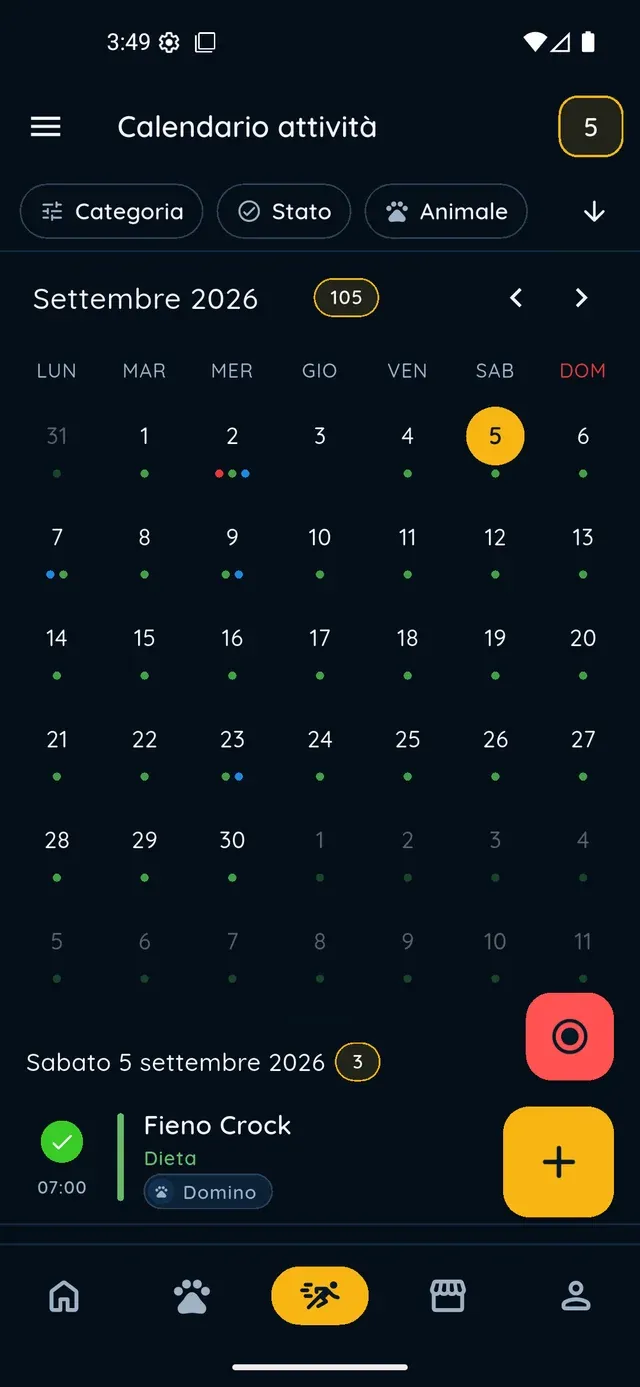
Yes. In the «Activities» tab tap «+», choose the type (walk, treatment, grooming, vet visit) and select all the dogs involved in the «Pets» row; you can add a time, reminders and a repeat rule. The activity appears in the calendar and in each dog's record.

How do we become a verified shelter for online adoptions?

You need PawsPet Business: with a business profile, pick the shelter under «Publishing as» and the listing price becomes an optional contribution for adopters. For verified shelter status open the «Profile» tab, then «Verification» » «Breeder verification» » «Fill in the dossier», choose «Shelter», add your registration details and attach a document.

PawsPet

Bring your shelter to PawsPet

Download PawsPet, register the first dog and invite the people who look after it. To publish in the shelter's name and suggest an optional contribution, move on to PawsPet Business.

Download PawsPet

App screenshots with demonstration or test data.