
PawsPet

PawsPet for non-profits

Animal sanctuary management software: horses, donkeys and farm animals

PawsPet is free animal sanctuary management software that lives on your phone, with no subscription: one record for every horse, donkey, goat, sheep or pig, with stable number or paddock, the DPA flag, hoof trims and shoeing in its history, and recurring feeds and treatments to tick off at every dose. Staff and volunteers join as collaborators with the permissions you set. It does not replace official registers.

Continue in PawsPet
Activities and reminders — PawsPet

PawsPet

Why it helps

Every species in the sanctuary, one record each

In the «Species» step pick Horse, Pony, Donkey, Sheep, Goat, Cow, Pig or Chicken and, under «Show all species», Duck, Goose and Turkey; for anything else choose «Other» and type the species yourself. Each record holds name, date of birth, sex, breed and photo.

Stable number, paddock and the DPA flag

Horses, ponies and donkeys get a «Stable number» field; for the others write the stall, pen or paddock in «Position» and find them again by searching the «Pets» list. The DPA flag marks animals intended for food production; microchip and booklet stay optional.

Hoof trims, shoeing and care in each animal's history

From the Health tab add «Hooves trimming» or «Hoof shoeing» for equines, with date, who performed it, cost and notes; for any species you log visits, vaccines, lab tests, illnesses and therapies. It all stays in the animal's «History» when the carer changes.

Staff and volunteers as collaborators

Invite anyone with a PawsPet account as a collaborator on the animals they look after and choose what they can view or edit: Health, Activities, profile details. With Edit on Health they log therapies and trims; documents and deletion stay with the sanctuary.

Multi-species sanctuaries

What it means for your day.

  1. Add every resident in five steps

    «Pets» tab, plus button: photo (or «Skip the photo»), name and date of birth; species from the grid and breed; sex, neutering, DPA flag, colour and distinguishing marks; «Position», «Stable number» for equines, booklet and microchip; then upload a document straight away or tap «Not now».

  2. Log hoof trims, shoeing and visits

    Health tab, plus button, then pick the type from the grid: «Hooves trimming» or «Hoof shoeing» for horses, ponies and donkeys, «Medical visit», «Vaccine», «Lab test» or «Therapy» for everyone. For trims and shoeing fill in date, who performed it, cost and notes; then attach photos and save.

  3. Set up recurring feeds and treatments

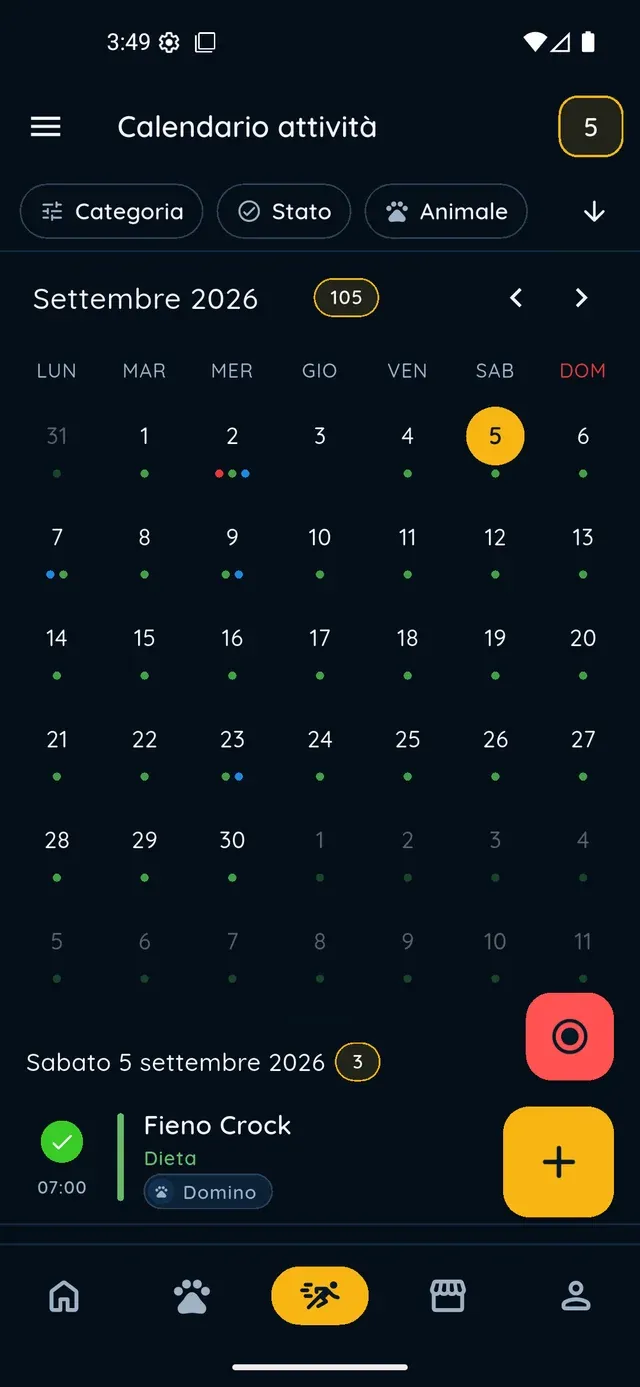
    Health tab, «Diet, therapies and treatments», «Add»: name, quantity, «Recurrent» with frequency and times, then «Create to-dos in activities». For the whole barn's hay create a «Feeding & supplies» activity for several animals with «Repeat». Whoever is on shift ticks it off in Activities.

From everyday care to a new family

An up-to-date profile helps you explain an animal’s character, habits and needs. Use the PawsPet adoption space to introduce them, while your organisation continues to handle conversations, assessments and adoption decisions.

Adoptions and finding a family

Multi-species sanctuaries

Frequently asked questions

Is PawsPet free animal sanctuary management software?

Yes. There is no subscription: records, health history, collaborators and adoption listings cost nothing. PawsPet keeps a fee only on orders paid in the app by people buying services from a business, which a sanctuary that sells nothing never uses.

How do I set up hay or a recurring treatment for one animal?

Health tab, «Diet, therapies and treatments», «Add»: choose Diet or Therapy, enter name and quantity, switch on «Recurrent», set frequency and times under «How often is it given?», then turn on «Create to-dos in activities»: every dose becomes an activity to tick off in the calendar. «Set alert» adds a push notification.

Can I create one reminder for feeding all the horses?

Yes. Activities tab, plus button, type «Feeding & supplies», then select every animal in the «Pets» row; open «Repeat», choose several times a day or every N days with the times, and save. The occurrences appear in the calendar by themselves and are completed one by one; to change them pick «This one only», «This and future» or «Entire series».

Can the sanctuary's volunteers work from the animal records?

Yes. Each volunteer has their own PawsPet account and you invite them as a collaborator on the animals they follow, searching by name or email. Permissions come in View/Edit pairs for Health, Activities, profile details and collaborators; there are no preset roles or expiry dates. They see the animals under «Shared with me»; documents stay with you.

Can we offer a donkey or a horse from the sanctuary for adoption?

Yes. From the animal's record open the menu and tap «Offer for adoption»: fill in the health declaration and text, tick the truthfulness box, then «Save draft» or «Publish». The listing is free, appears on the adoption pages of the PawsPet website and in links you share; the record follows the animal. Publishing as the sanctuary needs PawsPet Business.

PawsPet

Bring your sanctuary to PawsPet

Download PawsPet for free, register the first residents in five steps and invite the people on shift: trims, feeds and therapies stay in each animal's record, even when the carer changes.

Download PawsPet

App screenshots with demonstration or test data.