PawsPet

PawsPet Business for pet professionals

Online payments for pet sitters and groomers

PawsPet Business is the app that lets pet sitters, groomers and other pet businesses take online payments: clients pay by card in the app, you complete Stripe verification once without leaving the app, and payouts land in your bank account. No subscription: PawsPet keeps a fee only on orders paid in the app. For new profiles, payments are online only; in-person payments are not available.

Continue in PawsPet Business
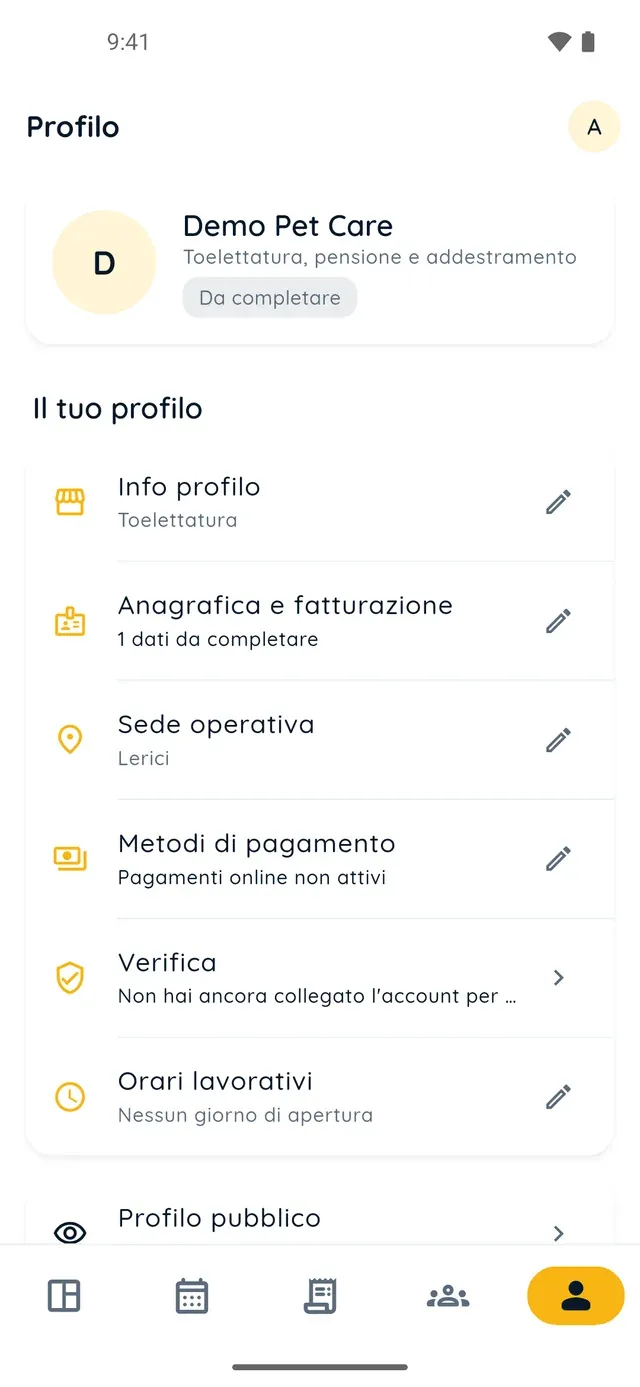
Business profile in PawsPet Business

PawsPet Business

Why it helps

Stripe verification without leaving the app

From «Profile» » «Verification» tap «Start the verification»: Stripe's form opens inside PawsPet Business and asks for your details, ID document and bank account. Once verified, you are listed in the marketplace, take card payments and get the verified badge.

No subscription, a fee only on orders paid in the app

Calendar, clients, price list and pet records are free. On every order paid in the app you see the bill line by line: «The customer paid», «PawsPet share», «Stripe fees» borne by PawsPet, and «Receive», your net amount. PawsPet discounts cost you nothing.

You can work before verification is complete

Create your profile and use the calendar, manual orders and your client list right away. Until Stripe verification is complete you are not listed in the marketplace and cannot take online payments: the Dashboard shows «You are not visible in the marketplace».

Balance, payouts and an automatic monthly transfer

In «Payouts» you see your available balance and the amount «Incoming». On the first of every month PawsPet transfers your whole balance by itself; if you need it sooner, request a manual payout (one per month), usually credited within 5-7 working days.

Online payments and payouts

What it means for your day.

  1. Complete Stripe verification inside the app

    From the «Profile created!» screen tap «Start the verification», or go to «Profile» » «Verification». In the «Payments and identity (Stripe)» box tap «Start the verification», choose «Individual» or «Company» and follow the Stripe form: personal details, ID document, bank account and terms.

  2. Collect the payment for the order

    When a client pays by card in the app, the order shows up in the «Orders» tab. Accept it with «Accept» » «Confirm»; if it moves to «Pre-authorized payment», tap «Collect payment» to actually charge the card. Under «Your earnings», the «Receive» line shows the net amount due to you.

  3. Receive payouts to your bank account

    The transfer starts by itself once the order counts as delivered: the client confirms receipt, or automatic confirmation kicks in. From «Profile» » «Payouts» you check your balance and «Incoming»; with «New payout» » «Continue» » «Confirm payout» you request a transfer before the monthly one.

Online payments and payouts

Frequently asked questions

How much do online payments for pet sitters and groomers cost in PawsPet Business?

No subscription and no monthly plan. PawsPet keeps a «PawsPet share» only on orders the client pays in the app; Stripe fees are borne by PawsPet and do not reduce your earnings beyond that share. A manual payout under 20 € costs 1 €. For new profiles, payments are online only: in-person payments are not available.

When does the money actually reach my bank account?

After the client confirms delivery (or after automatic confirmation), not when you accept the order or charge the card. The amount goes into your PawsPet balance: on the first of every month it is transferred in full to your bank account, or you request it earlier with «New payout». The bank usually credits it within 5-7 working days.

Do I have to leave the app to complete Stripe verification?

No: the Stripe form opens inside PawsPet Business. Only if the component fails to load does the app warn you and continue in your phone's browser; when you come back, the «Verification» page refreshes by itself. The same page always shows what is missing, what Stripe is reviewing and what you will be asked later.

Can I take bookings before verification is complete?

You can use the calendar, manually entered orders and your client list as usual, but you cannot take online payments or be found in the marketplace until Stripe verification is complete. On the «Verification» page two separate indicators, «Can take payments» and «Can receive payouts», show where you stand.

How do I change the bank account where I receive payouts?

«Profile» tab » «Verification» » «Manage account details»: the Stripe form reopens, already pre-filled, with the bank account to update. On the same page, «What you've given Stripe» shows bank, currency and the last digits of your account number, never sensitive values such as tax ID or ID document.

PawsPet Business

Get paid online with PawsPet Business

Download PawsPet Business, create your business profile and complete Stripe verification inside the app: clients pay you by card and payouts land in your bank account. No subscription, a fee only on orders paid in app.

Download PawsPet Business

Coming soon onApp StoreDownload onGoogle Play

PawsPet Business for iOS is coming soon to the App Store. App screenshots with demonstration or test data.